Showing posts with label TFS 2010. Show all posts

Wednesday, 17 July 2013

List all checked-out files in TFS


If you, like me have used various servers workspaces to develop on, then this command might come useful to see which files you have checked out where.

(needs to be run from Visual Studio’s console)
tf status <yoursourceroot> /user:<youruser> /recursive /format:detailed
Run this to get the same ouput for all users:
tf status <yoursourceroot> /user:* /recursive /format:detailed

Tuesday, 13 November 2012

Check-out/Check-in code programmatically in TFS 2010

We are using TFS 2010 to store MS Dynamics CRM 2011 solutions. I created a tool to export the solutions from the server to a file, but in an effort to automate and possibly speed up build deployments to test from our development environment I created a class with a few methods to check in and out files and directories.

The CommonHelper.WriteMessage and LogException methods, use a trace listener from System.Diagnostics to the write to a log file. The LogException method is in essence described in this post. It contains the code inside the catch statement.

Feel free to suggests improvements, as I'm not too sure this is the best way of doing it, all I can say is that it works [the excuse of the bad coder :-)].

 using System;
 using System.Collections.Generic;
 using System.Diagnostics;
 using System.IO;
 using System.Text;
 using Microsoft.TeamFoundation.Client;
 using Microsoft.TeamFoundation.VersionControl.Client;
 using System.Configuration;
 using System.Net;
 using DeploymentTool;
 
 namespace Deployment.ExportSolutions
 {
     public class TFSOperations
     {
         string collectionUrl, projectPath;
         NetworkCredential credential;
 
         public TFSOperations(string url, string path)
         {
             collectionUrl = url;
             projectPath = path;
 
             //I know, I know but nobody cares.
             string user = ConfigurationManager.AppSettings["user"];
             string password = ConfigurationManager.AppSettings["password"];
             string domain = ConfigurationManager.AppSettings["domain"];
 
             credential = new NetworkCredential(user, password, domain);
         }
 
         public string CollectionUrl
         {
             get { return collectionUrl; }
             set { collectionUrl = value; }
         }
 
         public string ProjectPath
         {
             get { return projectPath; }
             set { projectPath = value; }
         }
 
         public enum PathType
         {
             File,
             Directory
         };
 
         public bool CheckOut(string Path, PathType PathType, int RecursionLevel = 2)
         {
             bool result = false;
 
             try
             {
                 CommonHelper.WriteMessage(string.Format("Check that {0} {1} exists.", (PathType)PathType, Path));
 
                 if (PathType.Equals(PathType.File) && File.Exists(Path))
                 {
                     result = CheckOut(Path, RecursionType.None);
                 }
                 else if (PathType.Equals(PathType.Directory) && Directory.Exists(Path))
                 {
                     result = CheckOut(Path, (RecursionType)RecursionLevel);
                 }
                 else
                 {
                     CommonHelper.WriteMessage(string.Format("{0} {1} does not exist.", (PathType)PathType, Path));
                 }
             }
             catch (Exception ex)
             {
                 CommonHelper.LogException(ex);
             }
 
             return result;
 
         }
 
         public bool CheckIn(string Path, PathType PathType, int RecursionLevel = 2, string Comment = "I'm too lazy to write my own comment")
         {
             bool result = false;
 
             try
             {
                 CommonHelper.WriteMessage(string.Format("Check that {0} {1} exists.", (PathType)PathType, Path));
 
                 if (PathType.Equals(PathType.File) && File.Exists(Path))
                 {
                     result = CheckIn(Path, RecursionType.None, Comment);
                 }
                 else if (PathType.Equals(PathType.Directory) && Directory.Exists(Path))
                 {
                     result = CheckIn(Path, (RecursionType)RecursionLevel, Comment);
                 }
                 else
                 {
                     CommonHelper.WriteMessage(string.Format("{0} {1} does not exist.", (PathType)PathType, Path));
                 }
             }
             catch (Exception ex)
             {
                 CommonHelper.LogException(ex);
             }
 
             return result;
         }
 
         private bool CheckOut(string Path, RecursionType RecursionLevel)
         {
             bool result = false;
 
             CommonHelper.WriteMessage(string.Format("Get All LocalWorkspaceInfos."));
 
             WorkspaceInfo[] wsis = Workstation.Current.GetAllLocalWorkspaceInfo();
 
             foreach (WorkspaceInfo wsi in wsis)
             {
                 //Ensure that all this processing is for the current server.
                 if (!wsi.ServerUri.DnsSafeHost.ToLower().Equals(collectionUrl.ToLower().Replace("http://", "").Split('/')[0]))
                 {
                     continue;
                 }
 
                 Workspace ws = GetWorkspace(wsi);
 
                 CommonHelper.WriteMessage(string.Format("Check-Out {0}.", Path));
 
                 ws.PendEdit(Path, (RecursionType)RecursionLevel);
 
                 CommonHelper.WriteMessage(string.Format("Checked-Out {0}.", Path));
 
                 result = true;
             }
 
             return result;
         }
        
         private bool CheckIn(string Path, RecursionType RecursionLevel, string Comment)
         {
             bool result = false;
 
             try
             {
 
                 CommonHelper.WriteMessage(string.Format("Get All LocalWorkspaceInfos."));
 
                 WorkspaceInfo[] wsis = Workstation.Current.GetAllLocalWorkspaceInfo();
 
                 foreach (WorkspaceInfo wsi in wsis)
                 {
                     //Ensure that all this processing is for the current server.
                     if (!wsi.ServerUri.DnsSafeHost.ToLower().Equals(collectionUrl.ToLower().Replace("http://", "").Split('/')[0]))
                     {
                         continue;
                     }
 
                     Workspace ws = GetWorkspace(wsi);
 
                     var pendingChanges = ws.GetPendingChangesEnumerable(Path, (RecursionType)RecursionLevel);
 
                     WorkspaceCheckInParameters checkinParamenters = new WorkspaceCheckInParameters(pendingChanges, Comment);
 
                     if (RecursionLevel == 0)
                     {
                         CommonHelper.WriteMessage(string.Format("Check-in {0}.", Path));
                     }
                     else
                     {
                         CommonHelper.WriteMessage(string.Format("Check-in {0} with recursion level {1}.", Path, (RecursionType)RecursionLevel));
                     }
 
                     ws.CheckIn(checkinParamenters);
 
                     if (RecursionLevel == 0)
                     {
                         CommonHelper.WriteMessage(string.Format("Checked-in {0}.", Path));
                     }
                     else
                     {
                         CommonHelper.WriteMessage(string.Format("Checked-in {0}  with recursion level {1}.", Path, (RecursionType)RecursionLevel));
                     }
 
                     result = true;
                 }
 
             }
             catch (Exception ex)
             {
                 CommonHelper.LogException(ex);
             }
 
             return result;
         }
 
         private Workspace GetWorkspace(WorkspaceInfo wsi)
         {
 
             TfsTeamProjectCollection tpc = new TfsTeamProjectCollection(wsi.ServerUri, credential);
 
             CommonHelper.WriteMessage(string.Format("Get Workspace."));
 
             Workspace ws = wsi.GetWorkspace(tpc);
 
             return ws;
         }
 
     }
 }


Thursday, 8 November 2012

Delete Changeset/File in TFS 2010 using the tf destroy command

In quite a few places of our code, for various reasons, that I won't go into, we have passwords stored in the clear (it really would take too long too explain, seriously). Anyway, yesterday I used my own password and foolishly checked-in the file, which meant that my password was available for anybody to see.

I deleted the file and checked it back in without the password, but then I checked the changeset and sure enough the file with my password was there in the changeset. 

I know that what I did was really foolish for various reasons and it is ironic that it happened to me when I have been complaining to anybody that would listen (not many people) that this was a bad idea.

Anyway, after a lot of panicking and Googling, I was resigned to changing my password (This may not sound like too much hassle, but I have the same password on three domains, one of them is production), when I found this command:
tf destroy /?
TF - Team Foundation Version Control Tool, Version 10.0.30319.1
Copyright (c) Microsoft Corporation.  All rights reserved.

Destroys, or permanently deletes, version-controlled items from Team
Foundation version control.

tf destroy [/keephistory] itemspec1 [;versionspec]
           [itemspec2...itemspecN] [/stopat:versionspec] [/preview]
           [/startcleanup] [/noprompt] [/silent]
           [/login:username,[password]]
           [/collection:TeamProjectCollectionUrl]

Versionspec:
    Date/Time         D"any .Net Framework-supported format"
                      or any of the date formats of the local machine
    Changeset number  Cnnnnnn
    Label             Llabelname
    Latest version    T
    Workspace         Wworkspacename;workspaceowner
I ran the following command:
tf destroy $/myproj/mypath/myfile.cs /collection:mytfsserverurl
I would suggest running this first, though, which simulates the deletion process.
tf destroy $/myproj/mypath/myfile.cs /preview /collection:mytfsserverurl
I checked the changeset and the file with the password had gone, panic over.

Friday, 2 November 2012

Microsoft.Common.targets (1360): Could not resolve this reference. Could not locate the assembly "Microsoft.Deployment.WindowsInstaller" on TFS Build Server

We have TFS 2010 running on a Win 2k8 R2 (i.e. a 64 bit OS) server and I made some changes to the build last night, including adding a new Custom Action project for Wix, kicked it off before I left and this morning I was greeted with this error:
c:\Windows\Microsoft.NET\Framework64\v4.0.30319\Microsoft.Common.targets (1360): Could not resolve this reference. Could not locate the assembly "Microsoft.Deployment.WindowsInstaller". Check to make sure the assembly exists on disk. If this reference is required by your code, you may get compilation errors.
After a bit of googling I found the solution, a missing registry entry. It seems that by default the Wix installer adds the registry key to the Wow6432Node hive rather than the x64 hive, so all that is needed to make it work is to add the following registry key:
Windows Registry Editor Version 5.00 
[HKEY_LOCAL_MACHINE\SOFTWARE\Microsoft\.NETFramework\AssemblyFolders\Wix 3.6]
@="C:\\Program Files (x86)\\WiX Toolset v3.6\\SDK\\"
I provided it as a script so that it can be copied and pasted (obviously change to your wix version). 

What I don't quite understand is how it worked before?

Tuesday, 16 October 2012

Configure TFS 2010 as a build server - part 2

In part one of the series, I discussed how to install the build server role for TFS 2010.

Part 2 is a very short post with a list of pre-requisites before builds will work:

From the TFS 2010 server:
  1. Install Visual Studio 2010 Shell, which can be obtained here.
  2. Install Wix 3.x. Version 3.6 can be found here.
  3. Install Enterprise Library 5.0, which can be found here
If you have no need for Wix or the enterprise library you can skip steps 2 and 3.I do, so that's why they were installed.

In part 3 of the series I will discuss how to create build definitions.

Monday, 15 October 2012

Configure TFS 2010 as a build server - part 1

After a few weeks of trying to find the time I finally got around configuring our TFS 2010 server as a build server. Due to a dearth of servers in our environment our TFS server is actually an all in one server, DB included.

The only pre-requisite is an already configured instance of TFS 2010 and a default collection created.
  1. Start Team foundation server administration console. (Start| All programs | Microsoft Team Foundation 2010 | Team foundation server administration console)
  2. On the  Build Configuration item, click on Configure Installed Features, which will start this wizard.
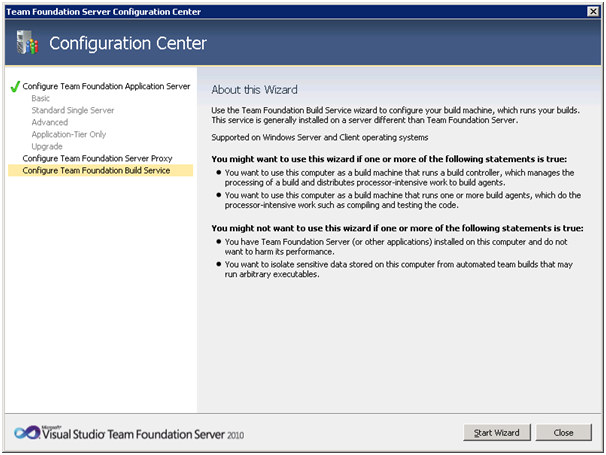
  3. Ensure Configure Team Foundation Build Service is selected and Click Start Wizard.
  4. Click Next.
  5. Select the relevant collection, in our case we are using the default collection and click Next.
  6. Click Next
  7.  Enter User Credentials and click Next.
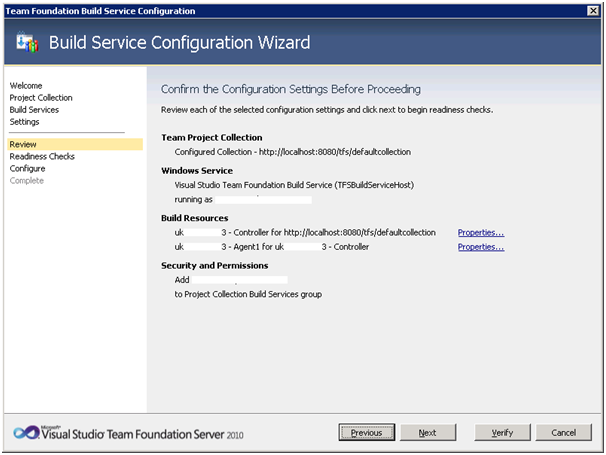
  8. Click Verify. [The warning is due to the Widnwos Firewall being switched off]
  9. Click Configure.
  10. Configuration should only take a few minutes.
  11. Configuration Completed.

At this point TFS is ready to start, however there are a few things that need to be installed in order for it to work properly. I will discuss these in in part 2. discuss the ne