Showing posts with label OpenSSL. Show all posts

Tuesday, 24 January 2012

It's a self signed world - Part 2. The joy of certificates - Part 7

Back in August I wrote a blog post describing how to use makecert to create a self signed CA, I also said that I would repeat the process but using OpenSSL, well your prayers have been answered. Since OpenSSL ships with most Linux distros and also works in Windows, this is the ideal tool for the job.

The key point of a self signed certificate is that, well, it is self signed, which means that it is only really good for development or testing as it won't be trusted by external users, particularly if accessing a website using a modern web browser. I guess you could also use it for internal services too.

At any rate, I'm running this from CentOS 6.2 using OpenSSL 1.0.0-fips 29 Mar 2010. In order to get the OpenSSL version just type:
openssl version
These are the steps needed to create a  self signed certificate using OpenSSL:
  1. Create server certificate private key: 
    openssl genrsa -des3 -out phpmyadmin.key 1024
  2. Create Certificate Signing Request, this is what you would normally pass to a CA (e.g. Verisign) for them to generate a signed certificate with. They normally check that you say who you are and after money has exchanged hands they issue with the public key signed by their CA:
    openssl req -new -key phpmyadmin.key -out phpmyadmin.csr
  3. Remove Passphrase from key. If you want to be prompted for the passphrase everytime Apache starts, then skip to step 4:
    cp phpmyadmin.key phpmyadmin.key.pass
    openssl rsa -in phpmyadmin.key.pass -out phpmyadmin.key
  4. Create public server certificate:
    openssl x509 -req -days 1000 -in phpmyadmin.csr -signkey phpmyadmin.key -out phpmyadmin.crt
That is it, you now have a private/public key pair that can be used for Apache, see this post for details on how to configure the certificates. Do note, that you don't actually have a CA so these two lines need to be commented out:
#   Server Certificate Chain:
SSLCertificateChainFile /etc/httpd/conf.d/certs/win2k8ca.cer

#   Certificate Authority (CA):
SSLCACertificateFile /etc/httpd/conf.d/certs/win2k8ca.cer
If you want to use this private/public key with IIS, then you need to convert it into a pkcs#12 format certificate, which you can do with the following command:
openssl pkcs12 -export -in phpmyadmin.crt -inkey phpmyadmin.key -out phpmyadmin.pfx
Please remember to import the certificate to the trusted root certification authorities of the server as well as your personal store to prevent any problems.

Thursday, 22 December 2011

Negotiate client certificate in IIS 6.0

The ongoing saga of our SSL issues continues. After some help from a kind soul, we got some java code to do mutual authentication against IIS but this wasn’t working either. If you are wondering why we are after some java code, well that is what they are throwing against IIS.

In my opinion, OpenSSL is the ultimate arbiter of all things SSL and OpenSSL was working, so I was a bit miffed to be asked to make some changes, but I do like playing about with computers so I thought I’d give it a go.

The feeling was that IIS implementation of the SSL handshake would not work with Apache’s HTTPClient and thus we needed to change IIS's configuration. It is true that IIS will only ask for the client certificate when the client makes a request, at which point there will be a renegotiation, rather than within the original handshake, but my understanding is that this is a perfectly valid approach, I’ll need to investigate whether this is indeed the case. In other words, IIS does a simple TLS handshake upon connection and then a renegotiation attempt, when an actual request is made to the server. This is simply a client authenticated handshake, that is initiated by the server via making a HelloRequest.

At any rate, I ran a couple of tests against our IIS dev box using OpenSSL, see this post for more details. Edited output from OpenSSL:
CONNECTED(00000003)
>>> TLS 1.0 Handshake [length 006c], ClientHello
    01 ... 00
<<< TLS 1.0 Handshake [length 0051], ServerHello
    02 ..   00
<<< TLS 1.0 Handshake [length 058e], Certificate
    0b ... 41
<<< TLS 1.0 Handshake [length 0004], ServerHelloDone
    0e 00 00 00
>>> TLS 1.0 Handshake [length 0086], ClientKeyExchange
    10 .. d1
>>> TLS 1.0 ChangeCipherSpec [length 0001]
    01
>>> TLS 1.0 Handshake [length 0010], Finished
    14 00 00 0c ae 1d da b8 d4 14 ab ed 03 50 77 a0
<<< TLS 1.0 ChangeCipherSpec [length 0001]
    01
<<< TLS 1.0 Handshake [length 0010], Finished
    14 00 00 0c d6 9b 9b 66 04 5d c6 5d d2 e1 25 7e
---
Certificate chain
 0 s:/C=US/ST=York/L=York/O=/OU=YORK/CN=server.dev.com
   i:/DC=com/DC=dev/CN=TESTAuthority
---
Server certificate
-----BEGIN CERTIFICATE-----
-----END CERTIFICATE-----
subject=/C=US/ST=York/L=York/O=YORK/OU=YORK/CN=server.dev.com
issuer=/DC=com/DC=dev/CN=TESTAuthority
---
No client certificate CA names sent
---
SSL handshake has read 1555 bytes and written 295 bytes
---
New, TLSv1/SSLv3, Cipher is RC4-MD5
Server public key is 1024 bit
Secure Renegotiation IS supported
Compression: NONE
Expansion: NONE
SSL-Session:
    Protocol  : TLSv1
    Cipher    : RC4-MD5
    Session-ID: 7C130000B6F9142AD5E179ECCEC696C6F3C3CE4E100B503ABF3477FD3F7AD8B3
    Session-ID-ctx:
    Master-Key: 44EA6B1B1AACCE188E097F3E904838F33361FAC67207B6311CC0477A2CEEFE6D8F2AE7AF338B9537713381D34460FE05
    Key-Arg   : None
    Krb5 Principal: None
    PSK identity: None
    PSK identity hint: None
    Start Time: 1324388318
    Timeout   : 7200 (sec)
    Verify return code: 0 (ok)
---
At this point a request is made to IIS:
GET /home.htm

<<< TLS 1.0 Handshake [length 0004], HelloRequest
    00 00 00 00
>>> TLS 1.0 Handshake [length 007b], ClientHello
    01 ... 00
<<< TLS 1.0 Handshake [length 0069], ServerHello
    02 ...7e
<<< TLS 1.0 Handshake [length 058e], Certificate
    0b ... 41
<<< TLS 1.0 Handshake [length 0c0f], CertificateRequest
    0d ... 79
<<< TLS 1.0 Handshake [length 0004], ServerHelloDone
    0e 00 00 00
>>> TLS 1.0 Handshake [length 09a4], Certificate
    0b ..    d4
>>> TLS 1.0 Handshake [length 0086], ClientKeyExchange
    10 ... 05
>>> TLS 1.0 Handshake [length 0086], CertificateVerify
    0f ... 9b
>>> TLS 1.0 ChangeCipherSpec [length 0001]
    01
>>> TLS 1.0 Handshake [length 0010], Finished
    14 00 00 0c 58 50 80 3d d0 74 f4 52 cb ad ad 50
<<< TLS 1.0 ChangeCipherSpec [length 0001]
    01
<<< TLS 1.0 Handshake [length 0010], Finished
    14 00 00 0c 3e d0 e2 69 96 29 7b 83 16 68 f7 c8

As I mentioned above the renegotiation process is started by the server and then all that follows is a simple client authenticated handshake. Note that the arrows indicate the direction from the server's perspective, so that the bold line means that the server is requesting a Certificate from the client.

This appears to be the problem, but how to solve it? Well, after a little bit of investigation it turns out that it is fairly easy to enable client certificate negotiation on, remembering that I’m using windows 2003. The httpcfg tool is all you need (maybe, see what happens after an iisreset below). This tool is available with the windows support tools package. There are a myriad of options for this tool but in this case we are only interested in a few commands.

List current SSL configuration with:
httpcfg query ssl

IP                      : 0.0.0.0:443
Hash                    : 76c659afffcb906038682de115c2 ddb2af7c113
Guid                    : {4dc3e181-e14b-4a21-b022-59fc669b0914}
CertStoreName           : MY
CertCheckMode           : 0
RevocationFreshnessTime : 0
UrlRetrievalTimeout     : 0
SslCtlIdentifier        :
SslCtlStoreName         :
Flags                   : 0

Note the typo in the hash field, i.e. the certificate thumbprint. For some reason it does not display zeros, so be careful if copying from the console.

Delete the binding, if the return code is not 0 there is a problem:
httpcfg –delete –i 0.0.0.0:443
HttpDeleteServiceConfiguration completed with 0.
Now you can add it again (there must be a better way of doing this?)
httpcfg set ssl -i 0.0.0.0:443 -h 76c659afffcb906038682de115c20ddb2af7c113 -g {4dc3e181-e14b-4a21-b022-59fc669b0914} -c MY -f 2
HttpDeleteServiceConfiguration completed with 0.
You can list current SSL configuration again and see the changes:
httpcfg query ssl
IP                      : 0.0.0.0:443
Hash                    : 76c659afffcb906038682de115c2 ddb2af7c113
Guid                    : {4dc3e181-e14b-4a21-b022-59fc669b0914}
CertStoreName           : MY
CertCheckMode           : 0
RevocationFreshnessTime : 0
UrlRetrievalTimeout     : 0
SslCtlIdentifier        : (null)
SslCtlStoreName         : (null)
Flags                   : 2
Now you can run the same OpenSSL command as above:
CONNECTED(00000003)
>>> TLS 1.0 Handshake [length 006c], ClientHello
    01 .. 00
<<< TLS 1.0 Handshake [length 0051], ServerHello
    02 ..    00
<<< TLS 1.0 Handshake [length 058e], Certificate
    0b ... 41
<<< TLS 1.0 Handshake [length 0c0f], CertificateRequest
    0d ... 79
<<< TLS 1.0 Handshake [length 0004], ServerHelloDone
    0e 00 00 00
>>> TLS 1.0 Handshake [length 09a4], Certificate
    0b .. d4
>>> TLS 1.0 Handshake [length 0086], ClientKeyExchange
    10 ... a4
>>> TLS 1.0 Handshake [length 0086], CertificateVerify
    0f .. 24
>>> TLS 1.0 ChangeCipherSpec [length 0001]
    01
>>> TLS 1.0 Handshake [length 0010], Finished
    14 00 00 0c 66 1d 74 73 26 4c 93 5a 24 e7 97 4d
<<< TLS 1.0 ChangeCipherSpec [length 0001]
    01
<<< TLS 1.0 Handshake [length 0010], Finished
    14 00 00 0c 76 d4 32 92 0f d8 b9 f8 f9 a8 72 b4
---
Certificate chain
 0 s:/C=US/ST=YORK/L=YORK/O=YORK/OU=YORK/CN=server.dev.com
   i:/DC=com/DC=dev/CN=TESTAuthority
---
Server certificate
-----BEGIN CERTIFICATE-----
-----END CERTIFICATE-----
subject=/C=US/ST=YORK/L=YORK/O=YORK/OU=YORK/CN=server.dev.com
issuer=/DC=com/DC=dev/CN=TESTAuthority
---
Acceptable client certificate CA names

/DC=com/DC=dev/CN=TESTAuthority
---
SSL handshake has read 4642 bytes and written 2907 bytes
---
New, TLSv1/SSLv3, Cipher is RC4-MD5
Server public key is 1024 bit
Secure Renegotiation IS supported
Compression: NONE
Expansion: NONE
SSL-Session:
    Protocol  : TLSv1
    Cipher    : RC4-MD5
    Session-ID: 4D12000059032A66B9D456537EDB9B0AAFA0D5762F94CED74DC8EC4E8F175B20
    Session-ID-ctx:
    Master-Key: 9C8A4CF2078FCE4B77DC9CD902DEA7B36AA64A7E110F0634F90FEA2D6AD5FA00BFA761C813387A2CBB2CA5683850724A
    Key-Arg   : None
    Krb5 Principal: None
    PSK identity: None
    PSK identity hint: None
    Start Time: 1324388273
    Timeout   : 7200 (sec)
    Verify return code: 0 (ok)
---
The key is the bolded line, the certificate request, which the server now makes during the initial handshake, or the handshake, as there will only be one handshake now. If no certificate is presented by the client, then the server concludes that no client certificate is being used and the handshake finishes successfully. It is worth noting that once a request is made to the server, this request will fail with 403.7.

If IIS is configured to accept, rather than require, client certificates, then CertificateRequest is only made when a certificate is presented to the server.

One little problem though, changes with the httpcfg tool do not appear to be permanent, which means that it is necessary to edit the IIS metabase, which you can find in <WindowsFolder>\system32\inetsrv\metabase.xml, to make them permanent.

Stop IIS and edit the file. I’m editing a website with id 2100412512, so I changed this:
<IIsWebServer  Location ="/LM/W3SVC/2100412512"
                                CertCheckMode="0"
                                SSLCertHash="76c659afffcb906038682de115c20ddb2af7c113"
                                SSLStoreName="MY"
                                SecureBindings=":443:"
                                ServerAutoStart="TRUE"
                                ServerBindings=":8080:"
                                ServerComment="test SSL website"
                >
To:
<IIsWebServer  Location ="/LM/W3SVC/2100412512"
                                CertCheckMode="0"
                                SSLAlwaysNegoClientCert="TRUE"
                                SSLCertHash="76c659afffcb906038682de115c20ddb2af7c113"
                                SSLStoreName="MY"
                                SecureBindings=":443:"
                                ServerAutoStart="TRUE"
                                ServerBindings=":8080:"
                                ServerComment="test SSL website"
                >
Start IIS and run:
httpcfg query ssl

IP                      : 0.0.0.0:443
Hash                    : 76c659afffcb906038682de115c2 ddb2af7c113
Guid                    : {4dc3e181-e14b-4a21-b022-59fc669b0914}
CertStoreName           : MY
CertCheckMode           : 0
RevocationFreshnessTime : 0
UrlRetrievalTimeout     : 0
SslCtlIdentifier        :
SslCtlStoreName         :
Flags                   : 2
SUCCESS

Sunday, 11 December 2011

Even More OpenSSL - Client Certificates

In these posts (1, 2), I discussed using OpenSSL as a simple SSL client to help troubleshoot SSL connections. I did not make any mention of client certificates because, to be honest, we hadn't got that far in our testing, but now that we have and, surprisingly enough, ran into trouble I thought I would discuss using client certificates with OpenSSL. 

In essence this is the command you need to run:
openssl s_client -CApath <pathtoCAcerts> -cert <clientcert> -key <clientcertkey> -pass <keypassphrase> -connect <serveripaddress>:443
where you can substitute CApath for CAfile if you only care about a single CA. The key and pass switches are optional, depending on your client certificate, e.g. if your client certificate has the key in the same file and no pass phrase you can omit them both.
openssl s_client -CAfile <pathtoCAcert> -cert <clientcert> -connect <serveripaddress>:443
You'll get something like this, showing only an extract from the response:
..
..
..
..
SSL handshake has read 1548 bytes and written 295 bytes
---
New, TLSv1/SSLv3, Cipher is RC4-MD5
Server public key is 1024 bit
Secure Renegotiation IS NOT supported
Compression: NONE
Expansion: NONE
SSL-Session:
    Protocol  : TLSv1
    Cipher    : RC4-MD5
    Session-ID: 92220000BD6498AD833C46B2F3660E6E8131F1233EF25B59A68311394CCBDB8F
    Session-ID-ctx:
    Master-Key: 717135CF0F753CAA1CE67A2713356A05D5C4AB32EE71AAA39F09C1696F865B727D36ACECC9CF8529A0A61C036E1607C7
    Key-Arg   : None
    Krb5 Principal: None
    PSK identity: None
    PSK identity hint: None
    Start Time: 1323622751
    Timeout   : 300 (sec)
    Verify return code: 0 (ok)
---
You now can try to communicate with the server, e.g. try to get a page:
GET /home.htm
This should return the contents of home.htm. In actual fact you get the whole server response, not just the page, as is to be expected:
depth=1 DC = com, DC = dev, CN = TESTAuthority
verify return:1
depth=0 C = US, ST = York, L = York, O = York, OU = York, CN = server.dev.com
verify return:1
read R BLOCK
HTTP/1.1 200 OK
Date: Sun, 11 Dec 2011 17:15:55 GMT
Server: Microsoft-IIS/6.0
X-Powered-By: ASP.NET
X-AspNet-Version: 2.0.50727
Cache-Control: private, max-age=0
Content-Type: text/html; charset=utf-8
Content-Length: 310
..
..
..
..
If you try without the client cert (e.g. openssl s_client -CAfile <pathtoCAcert> -connect <serveripaddress>:443), you will get an error page back (at least from IIS you do), when you try to to communicate with the server (e.g. GET /home.htm). Extract from response:
<h2>HTTP Error 403.7 - Forbidden: SSL client certificate is required.<br>Internet Information Services (IIS)</h2>

Thursday, 1 December 2011

More OpenSSL

In this post, I stated that the errors, see below in red, were due to the linux server not trusting the TESTAuthority CA, which is true and false. It's true in the strictest sense of the word, it's false in the sense that unlike Windows, Linux does not have a central repository for certificates and thus the concept of a Linux server trusting a CA is not quite correct.
CONNECTED(00000003)
depth=0 C = US, ST = York, L = York, O = York, OU = York, CN = crmdevbox.dev.com
verify error:num=20:unable to get local issuer certificate
verify return:1
depth=0 C = US, ST = York, L = York, O = York, OU = York, CN = crmdevbox.dev.com
verify error:num=27:certificate not trusted
verify return:1
depth=0 C = US, ST = York, L = York, O = York, OU = York, CN = crmdevbox.dev.com
verify error:num=21:unable to verify the first certificate
verify return:1
Since Linux does not have a central certificate repository we need to pass the CA certificate file to openssl, which we can do with the following command (Note that there is a -CApath switch to pass a directory rather than a single file, in case you want to store multiple CAs in the same place.):

openssl s_client -CAfile testauth.cer -connect server.dev.com:443

CONNECTED(00000003)
---
Certificate chain
 0 s:/C=US/ST=Yorkshire/L=Yorkshire/O=PHP/OU=PHP/CN=server.dev.com
   i:/DC=com/DC=dev/CN=TESTAuthority
---
Server certificate
-----BEGIN CERTIFICATE-----
MIIFgDCCBGigAwIBAgIKIkXHKgAAAAAAJzANBgkqhkiG9w0BAQUFADBCMRMwEQYK
CZImiZPyLGQBGRYDY29tMRMwEQYKCZImiZPyLGQBGRYDZGV2MRYwFAYDVQQDEw1U
RVNUQXV0aG9yaXR5MB4XDTExMTAyNTA4NTUwOFoXDTEzMTAyNDA4NTUwOFowajEL
MAkGA1UEBhMCVVMxEjAQBgNVBAgTCVlvcmtzaGlyZTESMBAGA1UEBxMJU2hlZmZp
ZWxkMQswCQYDVQQKEwGIUDELMArGA1UECxMCSFAxGTAXBgNVBAMTEGRoejMwNzAx
LmRldi5jb20wgZ8wDQYJKoZIhvcNAQEBBQADgY0AMIGJAoGBANNYoEklD7Rgnoq0
Ld1+YkKNVcMy9CLb40kmQ0E5f+7SXPDMqNS12yk81k21PQoioOVPSKG2+pAls/vw
QhbjMBeRXeYkrH6V5+nuBYogRVZil0xMeK5+lOJYwig+rHkd5bo8OU/ep+m0VaPj
k2k9+Ns3ZZ1FwlRf+s0KiT1iKVY1AgMBAAGjggLSMIICzjALBgNVHQ8EBAMCBaAw
RAYJKoZIhvcNAQkPBDcwNTAOBggqhkiG9w0DAgICAIAwDgYIKoZIhvcNAwQCAgCA
MAcGBSsOAwIHMAoGCCqGSIb3DQMHMBMGA1UdJQQMMAoGCCsGAQUFBwMBMB0GA1Ud
DgQWBBS6N5Bqj8MOTu9CmsXJXcE+sWRDlDAfBgNVHSMEGDAWgBQiuWOMgDSyXO0d
pdlFswWLTcSM+TCB9gYDVR0fBIHuMIHrMIHooIHloIHihoGtbGRhcDovLy9DTj1U
RVNUQXV0aG9yaXR5LENOPW1hcnMsQ049Q0RQLENOPVB1YmxpYyUyMEtleSUyMFNl
cnZpY2VzLENOPVNlcnZpY2VzLENOPUNvbmZpZ3VyYXRpb24sREM9ZGV2LERDPWNv
bT9jZXJ0aWZpY2F0ZVJldm9jYXRpb25MaXN0P2Jhc2U/b2JqZWN0Q2xhc3M9Y1JM
RGlzdHJpYnV0aW9uUG9pbnSGMGh0dHA6Ly9tYXJzLmRldi5jb20vQ2VydEVucm9s
bC9URVNUQXV0aG9yaXR5LmNybDCCAQYGCCsGAQUFBwEBBIH5MIH2MIGoBggrBgEF
BQcwAoaBm2xkYXA6Ly8vQ049VEVTVEF1dGhvcml0eSxDTj1BSUEsQ049UHVibGlj
JTIwS2V5JTIwU2VydmljZXMsQ049U2VydmljZXMsQ049Q29uZmlndXJhdGlvbixE
Qz1kZXYsREM9Y29tP2NBQ2VydGlmaWNhdGU/YmFzZT9vYmplY3RDbGFzcz1jZXJ0
aWZpY2F0aW9uQXV0aG9yaXR5MEkGCCsGAQUFBzAChj1odHRwOi8vbWFycy5kZXYu
Y29tL0NlcnRFbnJvbGwvbWFycy5kZXYuY29tX1RFU1RBdXRob3JpdHkuY3J0MCEG
CSsGAQQBgjcUAgQUHhIAVwBlAGIAUwBlAHIAdgBlAHIwDQYJKoZIhvcNAQEFBQAD
ggEBAKPrAW4nxI8AaNWpWHGnEHsUBy9C9jFEVLLXxP7jyawmfEgcBBpl+osxH1hG
FSFxYRa5ZVMhj6wMBMHlleftDZ7y5TunKFkOMqHhB027/SmYoqWw/XyWJxW8/EUq
9i3L5Aw1PV+/oF6Nm05VehXRlXF0ngHcwC4EYFCjt4R+/f7prMZHdvIZUq9VhtcV
VHdOl2NE7QizXdebrlyU5cIoS98XySgDuSjGeIOYY/z03jFghKv62qK5ituqQWYY
S17m516w5fSebBYhVfL5YZoCg5OXo346iZU320a6i5dZWHDDq89GkNp3i8aPxSZL
GyHRoPJzDBzo6WR+212a4j3zTEE=
-----END CERTIFICATE-----
subject=/C=US/ST=Yorkshire/L=Yorkshire/O=PHP/OU=PHP/CN=server.dev.com
issuer=/DC=com/DC=dev/CN=TESTAuthority
---
No client certificate CA names sent
---
SSL handshake has read 1548 bytes and written 295 bytes
---
New, TLSv1/SSLv3, Cipher is RC4-MD5
Server public key is 1024 bit
Secure Renegotiation IS NOT supported
Compression: NONE
Expansion: NONE
SSL-Session:
    Protocol  : TLSv1
    Cipher    : RC4-MD5
    Session-ID: D0210000497E9440E880E5360922751D08D60E7A480423FED6A6DCD78F88F9CF
    Session-ID-ctx:
    Master-Key: 350CEA4DCCC35DE78660106649A61B31EE78716BDDBDC7AF3EC1FF53C0C9885DB7529CC3854EA88881C73C596672570B
    Key-Arg   : None
    Krb5 Principal: None
    PSK identity: None
    PSK identity hint: None
    Start Time: 1322744645
    Timeout   : 300 (sec)
    Verify return code: 0 (ok)
---
No complaints about certificates now.:)

Tuesday, 29 November 2011

The joys of SSL - A simple SSL Server

Is there anything that OpenSSL cannot do?

In this post, I showed how it can be used to test cipher levels. Today I'll show how it can be used as a simple SSL server to test, .. an SSL client, I guess. Since I already have a CA, I'm going to use that CA, which means that I generate a certificate request using the following command:
openssl req -new -newkey rsa:1024 -nodes -subj '/CN=RHEL6Blade/O=dev.com/C=UK/ST=Yorkshire/L=Here' -keyout key.pem -out myreq.pem
I submit the certificate request to said CA and come back to my linux box with two files:
  • certificate file. Ensure that this was exported as a Base64 certificate - redhat.cer
  • pkcs7 file i.e. certificate chain - redhat.p7b
I concatenate the key and the certificate with the following command:
cat key.pem redhat.cer > key-cert.pem
I then convert the pkcs7 chain into a pem file with the following command:
openssl pkcs7 -in redhat.p7b -noout -out test.pem
Finally, I can run the SSL server with the following command:
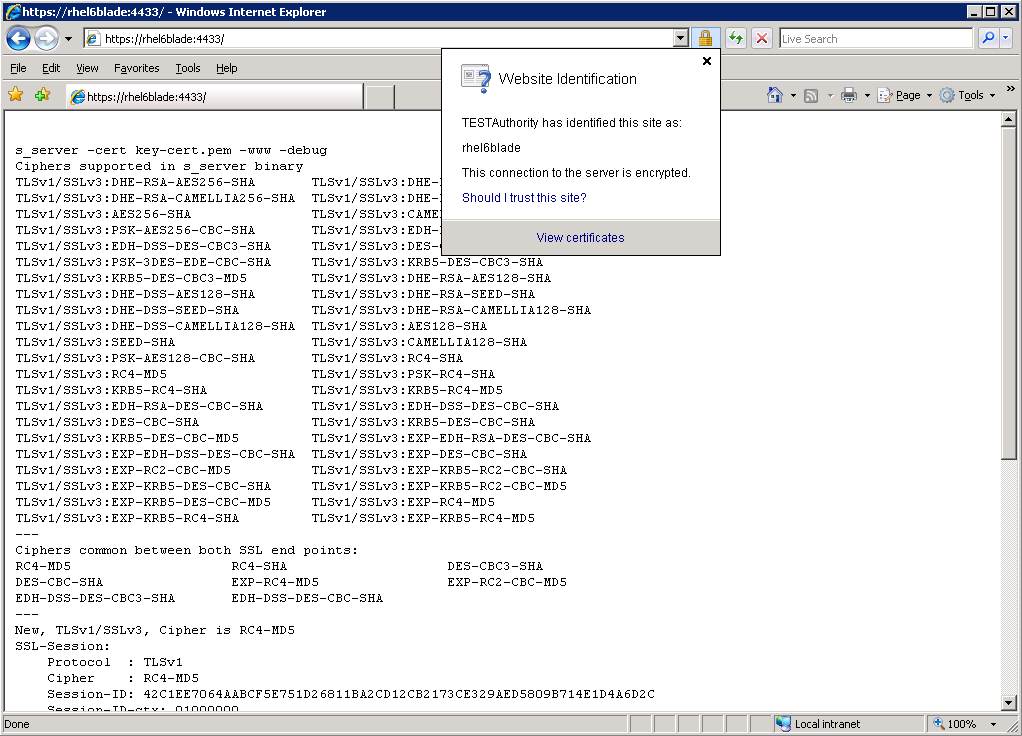
openssl s_server -cert key-cert.pem  -www -debug -CAfile test.pem
From a windows machine running IE 7, using the hostname only:


If I use the fully qualified domain name, I get this error as the url and the certificate name don't match:


If I omit the -CAfile command from the server, i.e:
openssl s_server -cert key-cert.pem  -www -debug
I get the same error even if I use the hostname. This is because the CA is not trusted (if the CA is trusted then there is no need to add the -CAfile modifier):

Friday, 25 November 2011

The joys of SSL - Cipher Levels

A few weeks ago we were tasked with ensuring that our IIS 6.0 server only allowed Medium and High ciphers, so in order to test what ciphers IIS accepted I used openssl from a linux box in our dev environment, like this.
openssl s_client -connect 10.168.20.109:443 -cipher NULL
CONNECTED(00000003)

140587511035720:error:140790E5:SSL routines:SSL23_WRITE:ssl handshake failure:s23_lib.c:184:

---

no peer certificate available

---

No client certificate CA names sent

---

SSL handshake has read 0 bytes and written 61 bytes

---

New, (NONE), Cipher is (NONE)

Secure Renegotiation IS NOT supported

Compression: NONE

Expansion: NONE

---

Cool, we don't accept Null ciphers

Let's try now with low ciphers


openssl s_client -connect 10.168.20.109:443 -cipher LOW
CONNECTED(00000003)
depth=0 C = US, ST = York, L = York, O = York, OU = York, CN = crmdevbox.dev.com
verify error:num=20:unable to get local issuer certificate
verify return:1
depth=0 C = US, ST = York, L = York, O = York, OU = York, CN = crmdevbox.dev.com
verify error:num=27:certificate not trusted
verify return:1
depth=0 C = US, ST = York, L = York, O = York, OU = York, CN = crmdevbox.dev.com
verify error:num=21:unable to verify the first certificate
verify return:1
---
Certificate chain
 0 s:/C=US/ST=York/L=York/O=York/OU=York/CN=crmdevbox.dev.com
   i:/DC=com/DC=dev/CN=TESTAuthority
---
Server certificate
-----BEGIN CERTIFICATE-----
MIIFgDCCBGigAwIBAgIKIkXHKgAAAAAAJzANBgkqhkiG9w0BAQUFADBCMRMwEQYK
CZImiZPyLGQBGRYDY29tMRMwEQYKCZImiZPyLGQBGRYDZGV2MRYwFAYDVQQDEw1U
RVNUQXV0aG9yaXR5MB4XDTExMTAyNTA4NTUwOFoXDTEzMTAyNDA4NTUwOFowajEL
MAkGA1UEBhMCVVMxEjAQBgNVBAgTCVlvcmtzaGlyZTESMBAGA1UEBxMJU2hlZmZp
ZWxkMQswCQYDVQQKEwJIUDELMAkGA1UECxMCSFAxGTAXBgNVBAMTEGRoejMwNzAx
LmRldi5jb20wgZ8wDQYJKoZIhvcNAQEBBQADgY0AMIGJAoGBANNYoEklD7Rgnoq0
Ld1+YkKNVcMy9CLb40kmQ0E5f+7SXPDMqNS12yk81k21PQoioOVPSKG2+pAls/vw
QhbjMBeRXeYkrH6V5+nuBYogRVZil0xMeK5+lOJYwig+rHkd5bo8OU/ep+m0VaPj
k2k9+Ns3ZZ1FwlRf+s0KiT1iKVY1AgMBAAGjggLSMIICzjALBgNVHQ8EBAMCBaAw
RAYJKoZIhvcNAQkPBDcwNTAOBggqhkiG9w0DAgICAIAwDgYIKoZIhvcNAwQCAgCA
MAcGBSsOAwIHMAoGCCqGSIb3DQMHMBMGA1UdJQQMMAoGCCsGAQUFBwMBMB0GA1Ud
DgQWBBS6N5Bqj8MOTu9CmsXJXcE+sWRDlDAfBgNVHSMEGDAWgBQiuWOMgDSyXO0d
pdlFswWLTcSM+TCB9gYDVR0fBIHuMIHrMIHooIHloIHihoGtbGRhcDovLy9DTj1U
RVNUQXV0aG9yaXR5LENOPW1hcnMsQ049Q0RQLENOPVB1YmxpYyUyMEtleSUyMFNl
cnZpY2VzLENOPVNlcnZpY2VzLENOPUNvbmZpZ3VyYXRpb24sREM9ZGV2LERDPWNv
bT9jZXJ0aWZpY2F0ZVJldm9jYXRpb25MaXN0P2Jhc2U/b2JqZWN0Q2xhc3M9Y1JM
RGlzdHJpYnV0aW9uUG9pbnSGMGh0dHA6Ly9tYXJzLmRldi5jb20vQ2VydEVucm9s
bC9URVNUQXV0aG9yaXR5LmNybDCCAQYGCCsGAQUFBwEBBIH5MIH2MIGoBggrBgEF
BQcwAoaBm2xkYXA6Ly8vQ049VEVTVEF1dGhvcml0eSxDTj1BSUEsQ049UHVibGlj
JTIwS2V5JTIwU2VydmljZXMsQ049U2VydmljZXMsQ049Q29uZmlndXJhdGlvbixE
Qz1kZXYsREM9Y29tP2NBQ2VydGlmaWNhdGU/YmFzZT9vYmplY3RDbGFzcz1jZXJ0
aWZpY2F0aW9uQXV0aG9yaXR5MEkGCCsGAQUFBzAChj1odHRwOi8vbWFycy5kZXYu
Y29tL0NlcnRFbnJvbGwvbWFycy5kZXYuY29tX1RFU1RBdXRob3JpdHkuY3J0MCEG
CSsGAQQBgjcUAgQUHhIAVwBlAGIAUwBlAHIAdgBlAHIwDQYJKoZIhvcNAQEFBQAD
ggEBAKPrAW4nxI8AaNWpWHGnEHsUBy9C9jFEVLLXxP7jyawmfEgcBBpl+osxH1hG
FSFxYRa5ZVMhj6wMBMHlleftDZ7y5TunKFkOMqHhB027/SmYoqWw/XyWJxW8/EUq
9i3L5Aw1PV+/oF6Nm05VehXRlXF0ngHcwC4EYFCjt4R+/f7prMZHdvIZUq9VhtcV
VHdOl2NE7QizXdebrlyU5cIoS98XySgDuSjGeIOYY/z03jFghKv62qK5ituqQWYY
S17m516w5fSebBYhVfL5YZoCg5OXo346iZU320a6i5dZWHDDq89GkNp3i8aPxSZL
GyHRoPJzDBzo6WR+212a4j3zTEE=
-----END CERTIFICATE-----
subject=/C=US/ST=York/L=York/O=York/OU=York/CN=crmdevbox.dev.com
issuer=/DC=com/DC=dev/CN=TESTAuthority
---
No client certificate CA names sent
---
SSL handshake has read 1556 bytes and written 251 bytes
---
New, TLSv1/SSLv3, Cipher is DES-CBC-SHA
Server public key is 1024 bit
Secure Renegotiation IS NOT supported
Compression: NONE
Expansion: NONE
SSL-Session:
    Protocol  : TLSv1
    Cipher    : DES-CBC-SHA
    Session-ID: B51700000B4CA5D162B9D228487DCCC53694945999BBE6F50BF1332ED8DA3D28
    Session-ID-ctx:
    Master-Key: E477BEE6E2A4D51D5FCAFB9AC385F89ED3FFDE06F4EEC5860A5080D655D18EDA3E483D7FA0CCE0EEDD454E9C3A847367
    Key-Arg   : None
    Krb5 Principal: None
    PSK identity: None
    PSK identity hint: None
    Start Time: 1322229571
    Timeout   : 300 (sec)
    Verify return code: 21 (unable to verify the first certificate)
oops, we do. Incidentally, I think the error (unable to verify the first certificate) is due to the linux box not trusting TESTAuthority.

So we did a little bit of hardening, which I'll post about separately, and now when we try again:
openssl s_client -connect 10.168.20.109:443 -cipher LOW
CONNECTED(00000003)

140587511035720:error:140790E5:SSL routines:SSL23_WRITE:ssl handshake failure:s23_lib.c:184:

---

no peer certificate available

---

No client certificate CA names sent

---

SSL handshake has read 0 bytes and written 61 bytes

---

New, (NONE), Cipher is (NONE)

Secure Renegotiation IS NOT supported

Compression: NONE

Expansion: NONE

---

Result.

You can try with Medium or High ciphers too.