Friday, 28 February 2014

Import Solution issues in Ms Dynamics CRM - Brain Dump 5

A few weeks back we were trying to import the main solution to our test environment when hit a particularly nasty issue:
Index size error
Updating mre_stamp.mre_name.Length is not valid because this is an indexed attribute and hence cannot have size greater than 900. Original value:200. New value:1000. Existing index is ndx_mre_name with type=6
The obvious solution here is to remove the index and set the field length back to the original value, but if that's not an option then and alternative solution would be to do this:

 1. Unzip the solution zip file.
 2. Open the customizations.xml file in your favourite text editor.
 3. Search for the <attribute PhysicalName="<attributeName>" (use the attribute from the error).
 4. You are looking for something like this (Notice how Length is greater than MaxLength):


 5. Change Length to the same value as MaxLength.
 6. Repeat 3-5 for each field in the SQL index.
 7. Re-Zip the solution file, making sure that the customizations.xml file is in the root folder.
 8. Re-Import Solution.

Thursday, 27 February 2014

Interesting Issues with Join-Path in PowerShell - Brain Dump 4

Another post part of the brain dump series

It turns out that Join-Path can't be used reliably for remote paths, allow me to explain

This will work fine:
PS C:\Users\John> Join-Path "\\SecretMachine\E$\SecretDirectory" "ReallySecretDirectory"
\\SecretMachine\E$\SecretDirectory\ReallySecretDirectory
But this won't:
PS C:\Users\John> Join-Path "E:\SecretDirectory" "ReallySecretDirectory"
Join-Path : Cannot find drive. A drive with the name 'e' does not exist.
At line:1 char:10
+ Join-Path <<<<  "e:\SecretDirectory" "ReallySecretDirectory"
    + CategoryInfo          : ObjectNotFound: (e:String) [Join-Path], DriveNotFoundException
    + FullyQualifiedErrorId : DriveNotFound,Microsoft.PowerShell.Commands.JoinPathCommand

Essentially, Join-Path can handle non-existent UNC paths but if it looks like a local path it expects it to be there.

You can force Join-Path to try to resolve the UNC path but it doesn't look like you can prevent it for local paths.
PS C:\Users\John> Join-Path "\\SecretMachine\F$" "SecretDirectory" -Resolve
Join-Path : Cannot find path '\\SecretMachine\F$\SecretDirectory' because it does not exist.
At line:1 char:10
+ Join-Path <<<<  "\\SecretMachine\F$" "SecretDirectory" -Resolve
    + CategoryInfo          : ObjectNotFound: (\\SecretMachine\F$\SecretDirectory:String) [Join-Path], ItemNotFoundExc
   eption
    + FullyQualifiedErrorId : PathNotFound,Microsoft.PowerShell.Commands.JoinPathCommand

Wednesday, 26 February 2014

Issues building WiX installer, missing libraries (dlls) - Brain Dump 3

By default Visual Studio will not copy libraries that are installed in the GAC to the output folders, which means that the WiX project that looks for those libraries will fail to build as the libraries will not be there.

I'm not sure if there is a way to override this behaviour in Visual Studio (Copy Always does not seem to make a difference), so ... just remove the libraries from the GAC.

Tuesday, 25 February 2014

Ms Dynamics CRM 2011 integration with Ms Sharepoint 2010 - Brain Dump 2

A few weeks back we went live and had a couple of issue getting the integration between Dynamics CRM 2011 and SharePoint 2010 working:

1. It would say that the list component was not installed.

I tried following this link to no avail and then reading the comments I realized that I had the same issue as the last comment, namely I was using my account rather than the service account to configure the integration and my account does not have any permissions in SP.

2. I also had this issue.

I followed solution (workaround) number IV.

Monday, 24 February 2014

Boxing issues in C# - Brain Dump 1

I'm going through my emails collecting all the interesting stuff that I have accrued over the past year or so, most of it not mine and dumping it here in various posts, I could just keep the pst file but ....

       [TestMethod]
       public void TestMethod1()
        {
            decimal d1 = 20;
            decimal d2 = 20;

            Assert.IsTrue(compare (d1, d2));
        } 

        private bool compare (object o1, object o2)
        {
            return o1 == o2;
        }

The test above will fail, should use this instead:

        private bool compare (object o1, object o2)
        {
            return o1.Equals(o2);
        }

Thursday, 13 February 2014

UNEXPECTED: no fault?

Sometimes Microsoft developers are so surprised when their products do work that you get pearls like this:(From trace log of a MS Dynamics CRM 2011 Server and yes I know)

[2014-02-12 07:57:08.825] Process: w3wp |Organization:00000000-0000-0000-0000-000000000000 |Thread: 7 |Category: Platform |User: 00000000-0000-0000-0000-000000000000 |Level: Error |ReqId: f298a0cd-f960-4365-b2c3-b855d2462e1a | ExceptionConverter.ConvertToFault ilOffset = 0x57
>UNEXPECTED: no fault?

Monday, 10 February 2014

Disable Export to Excel from SQL Server Reporting Server 2008/2012

We had an interesting request last week from the business. They were concerned that some users were exporting data to excel and running the business from excel, which was quite surprising as I distinctly remember making sure that nobody had permissions to do so.

Turns out that they were exporting the reports which are old fashioned SSRS reports.

So we decided to disable export to all formats but PDF.

Look for the rsreportserver.config file and change the Render section to this (in essence add Visible="false" to any extension you don't want to allow to be exported):

<Render>

<Extension Name="XML" Type="Microsoft.ReportingServices.Rendering.DataRenderer.XmlDataReport,Microsoft.ReportingServices.DataRendering" Visible="false"/>

<Extension Name="NULL" Type="Microsoft.ReportingServices.Rendering.NullRenderer.NullReport,Microsoft.ReportingServices.NullRendering" Visible="false"/>

<Extension Name="CSV" Type="Microsoft.ReportingServices.Rendering.DataRenderer.CsvReport,Microsoft.ReportingServices.DataRendering" Visible="false"/>

<Extension Name="ATOM" Type="Microsoft.ReportingServices.Rendering.DataRenderer.AtomDataReport,Microsoft.ReportingServices.DataRendering" Visible="false"/>

<Extension Name="PDF" Type="Microsoft.ReportingServices.Rendering.ImageRenderer.PDFRenderer,Microsoft.ReportingServices.ImageRendering"/>

<Extension Name="RGDI" Type="Microsoft.ReportingServices.Rendering.ImageRenderer.RGDIRenderer,Microsoft.ReportingServices.ImageRendering" Visible="false"/>

<Extension Name="HTML4.0" Type="Microsoft.ReportingServices.Rendering.HtmlRenderer.Html40RenderingExtension,Microsoft.ReportingServices.HtmlRendering" Visible="false"/>

<Extension Name="MHTML" Type="Microsoft.ReportingServices.Rendering.HtmlRenderer.MHtmlRenderingExtension,Microsoft.ReportingServices.HtmlRendering" Visible="false"/>

<Extension Name="EXCEL" Type="Microsoft.ReportingServices.Rendering.ExcelRenderer.ExcelRenderer,Microsoft.ReportingServices.ExcelRendering" Visible="false"/>

<Extension Name="RPL" Type="Microsoft.ReportingServices.Rendering.RPLRendering.RPLRenderer,Microsoft.ReportingServices.RPLRendering" Visible="false" LogAllExecutionRequests="false"/>

<Extension Name="IMAGE" Type="Microsoft.ReportingServices.Rendering.ImageRenderer.ImageRenderer,Microsoft.ReportingServices.ImageRendering" Visible="false"/>

<Extension Name="WORD" Type="Microsoft.ReportingServices.Rendering.WordRenderer.WordDocumentRenderer,Microsoft.ReportingServices.WordRendering" Visible="false"/>

</Render>

Monday, 3 February 2014

List privileges for security roles in Microsoft Dynamics CRM 2011/2013

So a couple of weeks back I was asked to disable export to excel functionality for all users, unfortunately nobody was sure which roles had the Export To Excel privilege (prvExportToExcel) so I used this query to find out:

select r.name as Role, x.label,p.Name,
case p.accessright -- technically a bit field, but CRM treats as an int
when 1 then 'Read'
when 2 then 'Write'
when 4 then 'Append'
when 16 then 'AppendTo'
when 32 then 'Create'
when 65536 then 'Delete'
when 262144 then 'Share'
when 524288 then 'Assign'
else '?' end as Permission,

case rp.PrivilegeDepthMask -- technically a bit field, but CRM treats as an int
when 1 then 'User'
when 2 then 'BusinessUnit'
when 4 then 'Parent:Child'
when 8 then 'Organisation'
else '?' end as Scope
from role r

left join RolePrivileges rp on r.roleid = rp.roleid
left join Privilege p on rp.privilegeid = p.privilegeid
left join PrivilegeObjectTypeCodes potc on p.privilegeid = potc.privilegeid
left join MetadataSchema.Entity e on potc.objecttypecode = e.objecttypecode
left join (select max(overwritetime) as owt, label, localizedlabelid, objectid, objectcolumnname from 

MetadataSchema.LocalizedLabel group by localizedlabelid, label, objectid, objectcolumnname) as x on e.entityid= x.objectid and x.objectcolumnname = 'LocalizedName'

where p.name like 'prvExportToExcel'
order by r.name, e.logicalname, 3, 4

The left joins are necessary to ensure that the On/Off privileges like Export To Excel are included. This was the result.

Tuesday, 28 January 2014

Error: ID4175: The issuer of the security token was not recognized by the IssuerNameRegistry in Ms Dynamics CRM 2011

Came back from a long weekend yesterday to be greeted by a non working development environment. It was prompting for credentials when logging in to Dynamics CRM. Thus, after having done what any self respecting developer would've done, namely bounce IIS, I decided to have a look at the logs, where I found this:
Error: ID4175: The issuer of the security token was not recognized by the IssuerNameRegistry. To accept security tokens from this issuer, configure the IssuerNameRegistry to return a valid name for this issuer.
Error Message: ID4175: The issuer of the security token was not recognized by the IssuerNameRegistry. To accept security tokens from this issuer, configure the IssuerNameRegistry to return a valid name for this issuer.

Source File: Not available

Line Number: Not available

Request URL: https://devcrm1.dev.local/default.aspx

Stack Trace Info: [SecurityTokenException: ID4175: The issuer of the security token was not recognized by the IssuerNameRegistry. To accept security tokens from this issuer, configure the IssuerNameRegistry to return a valid name for this issuer.]
at Microsoft.IdentityModel.Tokens.Saml11.Saml11SecurityTokenHandler.CreateClaims(SamlSecurityToken samlSecurityToken)
at Microsoft.IdentityModel.Tokens.Saml11.Saml11SecurityTokenHandler.ValidateToken(SecurityToken token)
at Microsoft.IdentityModel.Tokens.SecurityTokenHandlerCollection.ValidateToken(SecurityToken token)
at Microsoft.IdentityModel.Web.TokenReceiver.AuthenticateToken(SecurityToken token, Boolean ensureBearerToken, String endpointUri)
at Microsoft.IdentityModel.Web.WSFederationAuthenticationModule.SignInWithResponseMessage(HttpRequest request)
at Microsoft.IdentityModel.Web.WSFederationAuthenticationModule.OnAuthenticateRequest(Object sender, EventArgs args)
at Microsoft.Crm.Authentication.Claims.CrmFederatedAuthenticationModule.OnAuthenticateRequest(Object sender, EventArgs args)
at System.Web.HttpApplication.SyncEventExecutionStep.System.Web.HttpApplication.IExecutionStep.Execute()
at System.Web.HttpApplication.ExecuteStep(IExecutionStep step, Boolean& completedSynchronously)

Some sort of ADFS issue, I thought to myself. So I jumped onto the Dev ADFS box and found no correlated errors :(

I checked the Relying Party Trusts and the CRM one was fine, not showing any errors, I even went as far as using the test url facility, but alas, no dice.
During my general sweep of ADFS, I looked at the certificates and .... there were new certificates as the old ones were about to expire:


This means that the certificate thumbprint for token signing being used by Dynamics CRM is wrong and needs changing. This is trivial for web services, as all you need to do is change the bold line in the web.config to reflect the new certificate thumbprint.
 <microsoft.identityModel>
    <service name="MyCustom.Service.Something">
      <audienceUris>
        <add value="https://devcrm1.dev.local:1337/MyCustom.Service.Something/Service.svc" />    
      </audienceUris>
      <issuerNameRegistry type="Microsoft.IdentityModel.Tokens.ConfigurationBasedIssuerNameRegistry, Microsoft.IdentityModel, Version=3.5.0.0, Culture=neutral, PublicKeyToken=31bf3856ad364e35">
        <trustedIssuers>
          <add thumbprint="5CE1DB0783B190D1CE4481B9C39CAD61AC6ACD56" name="http://adfs.dev.local/adfs/services/trust" />        </trustedIssuers>
      </issuerNameRegistry>
    </service>
  </microsoft.identityModel>

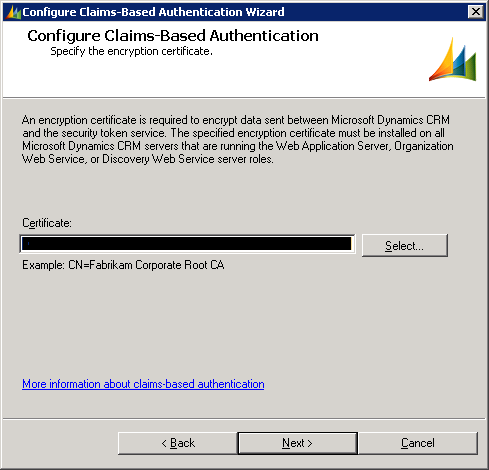
In MS Dynamics CRM things are perhaps simpler as there is no editing of the web.config file just a reconfiguration of Claims-Based Authentication (really, just run through the wizard as all other settings should already be correct):

1. Start the Deployment Manager:


2. Click Configure Claims-Based Authentication, which will launch the wizard and continue clicking next until the end of the Wizard.


3. Restart IIS.

Having done this, I was able to access my Dev environment again.

Friday, 24 January 2014

The Anti-Pattern Game

Last week a fellow IT professional and I, came up with The Anti-Pattern Game ™

The mechanics are very basic:

Wikipedia has a handy page with a number of Anti-Patterns

  • You add a point for each anti-Pattern listed in the Wikipedia article currently in use in your Company/Project.
  • You subtract a point for each anti-Pattern listed in the Wikipedia article that was used in your Company/Project but no longer is.

You get bonus points for anti-patterns in use but not listed in the article and not covered by the ones listed.

So how did my project do?

  • Escalation of commitment: Failing to revoke a decision when it proves wrong.
  • Management by perkele: Authoritarian style of management with no tolerance of dissent.
  • Management by objectives: Management by numbers, focus exclusively on quantitative management criteria, when these are non-essential or cost too much to acquire.
  • Mushroom management: Keeping employees uninformed and misinformed; employees are described as being kept in the dark and fed manure, left to stew, and finally canned.
  • Avalanche: An inappropriate mashup of the Waterfall model and Agile Development techniques.
  • Scope Creep: Uncontrolled changes or continuous growth in a project’s scope, or adding new features to the project after the original requirements have been drafted and accepted. (Also known as requirement creep and feature creep.)
  • Bystander apathy: When a requirement or design decision is wrong, but the people who notice this do nothing because it affects a different group of people.
  • Stovepipe system: A barely maintainable assemblage of ill-related components.
  • Boat anchor: Retaining a part of a system that no longer has any use.
  • Error hiding: Catching an error message before it can be shown to the user and either showing nothing or showing a meaningless message. Also can refer to erasing the Stack trace during exception handling, which can hamper debugging.
  • Lasagna code: Programs whose structure consists of too many layers.
  • Tester Driven Development: Software projects in which new requirements are specified in bug reports.

We've also dabbled with the crunch mode anti-pattern but it seems on as needed basis, thus not sure how to score it, so I have left it out.

In red is an anti-pattern the project no longer engages in.

My current project achieved a respectable: 10

To be fair, some of the anti-patterns are direct results of the technology used but still, 10 seems like a respectable score.

What about yours?