Thursday, 31 December 2015

Cloning Reddit to learn ASP.NET 5 - Part 2

In the previous post we got started in our quest to build a Reddit Clone. We ended up with a broken project so let's try to fix that.

The first thing is to add a UserDetails class and then link it to a RedditUser class, which will also need to be added to the Models folder.

UserDetails.cs
namespace Reddit.Models
{
    public class UserDetails
    {
        public int UserId { get; set; }
        public long LinkKarma { get; set; }
        public long CommentKarma { get; set; }
        public RedditUser User { get; set; }      
    }
}

RedditUser.cs
namespace Reddit.Models
{
    public class RedditUser
    {
        public int RedditUserId { get; set; }
        public string Nick { get; set; }
        public UserDetails UserDetails { get; set; }
    }
}

We will further modify the RedditUser class to allow users to login, that's the reason for the rather small class. If this were a real clone then we'd probably want to use Guids for the Keys.

At this point we should have a working project again, which can be verified by building and/or debugging it.

We now want to create the database with the RedditUser and UserDetails and the right relationships between them, namely a 1 to 1 relationship.

Firstly, modify the Startup.cs file so that the Configuration property is static, which will allow us access to this property without having to instantiate the class again and to add the EntityFramework service.
public static IConfigurationRoot Configuration { get; set; }

public void ConfigureServices(IServiceCollection services)
        {
            // Add framework services.
            services.AddMvc();
            services.AddEntityFramework()
                .AddSqlServer()
                .AddDbContext<RedditContext>();      
        }
Edit the appsettings.json file
 "Data": {
    "RedditContextConnection": "Server=(localdb)\\MSSQLLocalDB;Database=Reddit;Trusted_Connection=true;MultipleActiveResultSets=true"
  }
Finally let's edit the Context class (RedditContext.cs)
using Microsoft.Data.Entity;

namespace Reddit.Models
{
    public class RedditContext : DbContext
    {
        public RedditContext()
        {
            //Database.EnsureCreated();
        }

        protected override void OnConfiguring(DbContextOptionsBuilder optionsBuilder)
        {
            var connection = Startup.Configuration["Data:RedditContextConnection"];
            optionsBuilder.UseSqlServer(connection);
            base.OnConfiguring(optionsBuilder);          
        } 

        protected override void OnModelCreating(ModelBuilder modelBuilder)
        {
            modelBuilder.Entity<RedditUser>()
                .HasKey(x => x.RedditUserId);

            modelBuilder.Entity<UserDetails>()
                .HasKey(x => x.UserId);
            
            modelBuilder.Entity<RedditUser>()
                .HasOne(x => x.UserDetails)
                .WithOne(x => x.User);

            base.OnModelCreating(modelBuilder);
        }
    }
}

The OnConfiguring method sets up the connection String to the database.

The OnModelCreating method sets up the relationship between the tables in the database, it's worth mentioning here that I'm using the Fluent API to do this, but it's also possible to do it via data annotations.

I'm torn as to what the best way of doing this is, as both have advantages and disadvantages. I suspect that I will stick to the this syntax for the time being, even if I probably won't need any of the features that it provides over and above data annotations

I have added explicitly added the Primary Keys for each table, this is only necessary for UserDetails as the Key is different to the table name (I think) Now we can add create the database, from src\Reddit run the following command, which will create a Migration called Start:
 dnx ef migrations add Start 
Note that a new folder called Migrations will be created and populated with two files: A migration file, normally named DateTime_MigrationName and a model Snapshot.

When I first run this, it created the database. This was due to the commented out logic in the constructor, which wasn't commented out, once it was commented out, the expected behaviour resumed and we need to run the following command to apply the changes:
dnx ef database update
Let's add a few more models for SubReddit, Posts and Comments:

using System.Collections.Generic;

namespace Reddit.Models
{
    public class SubReddit
    {
        public int SubRedditId { get; set; }
        public string Name { get; set; }
        public bool IsPublic { get; set; }
        public List<Post> Posts { get; set; }
        public List<RedditUser> { get; set; }
        public bool IsBanned { get; set; }

    }
}
using System.Collections.Generic;

namespace Reddit.Models
{
    public class Post 
    {
        public int PostId { get; set; }
        public string Title { get; set; }
        public string Content { get; set; }
        public string Link { get; set; }
        public int UpVotes { get; set; }
        public int DownVotes { get; set; }
        public List<Comment> Comments { get; set; }
        public RedditUser Author { get; set; }
        public int AuthorId { get; set; }
        public SubReddit SubReddit { get; set; }
        public int SubRedditId { get; set; }


    }
}
namespace Reddit.Models
{
    public class Comment
    {
        public int CommentId { get; set; }
        public string Title { get; set; }
        public string Text { get; set; }
        public int UpVotes { get; set; }
        public int DownVotes { get; set; }
        public RedditUser Author { get; set; }
        public int AuthorId { get; set; }
    }
}
I have added Foreign Keys to Comment and Post to make querying easier. We create another migration called Core and apply it
dnx ef migrations add Core
dnx ef database update
Oddly nothing happens, why?

Wednesday, 30 December 2015

Cloning Reddit to learn ASP.NET 5 - Part 1

I've always found it a bit boring to follow a book or video to try to learn a new, or old technology, so I thought I would try a different approach this time.

I would set myself a project, which while perhaps not that much better than a Bicycle store at least it would be more interesting for me.

So I'm doing a clone of Reddit...obviously it won't be a fully functional clone of Reddit but it should have most of the functionality, which will create some interesting challenges.

I don't know how many posts there will be as I am making it up as I go along.

DISCLAIMER

I'm using this as a learning experience, so there is likely a lot that will be wrong, which I will try to amend when I realize that it is wrong so please bear that in mind if you're reading this. It also means that some things might get changed dramatically but I guess that's part of the learning process, right?

Pre-Requisites

  • Visual Studio 2015 (A free edition can be downloaded from this page)
  • ASP.NET 5 RC 1, which can be downloaded from here

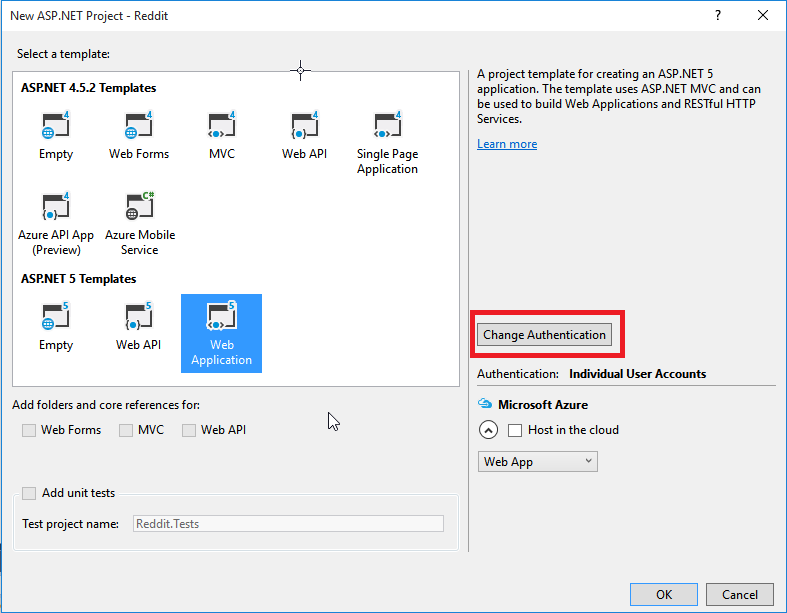
We start by creating a new Web Application Project in Visual Studio, which we'll call Reddit:


Ensure that you select Web Application but rather than use the Out of the Box Authentication we'll use no authentication.


We are going to need to use a database to store all the data, controversially, I'm not using a NOSQL DB, although EF7 will support them

Let's add Entity Framework to the project.

We have to edit the project.json file to do this. The added parts in bold. 
"dependencies": {
    "EntityFramework.Core": "7.0.0-rc1-final",
    "EntityFramework.Commands": "7.0.0-rc1-final",
    "EntityFramework.MicrosoftSqlServer": "7.0.0-rc1-final",
    "Microsoft.AspNet.Diagnostics": "1.0.0-rc1-final",
    "Microsoft.AspNet.IISPlatformHandler": "1.0.0-rc1-final",
    "Microsoft.AspNet.Mvc": "6.0.0-rc1-final",
    "Microsoft.AspNet.Mvc.TagHelpers": "6.0.0-rc1-final",
    "Microsoft.AspNet.Server.Kestrel": "1.0.0-rc1-final",
    "Microsoft.AspNet.StaticFiles": "1.0.0-rc1-final",
    "Microsoft.AspNet.Tooling.Razor": "1.0.0-rc1-final",
    "Microsoft.Extensions.Configuration.FileProviderExtensions": "1.0.0-rc1-final",
    "Microsoft.Extensions.Configuration.Json": "1.0.0-rc1-final",
    "Microsoft.Extensions.Logging": "1.0.0-rc1-final",
    "Microsoft.Extensions.Logging.Console": "1.0.0-rc1-final",
    "Microsoft.Extensions.Logging.Debug": "1.0.0-rc1-final",
    "Microsoft.VisualStudio.Web.BrowserLink.Loader": "14.0.0-rc1-final"
  },

  "commands": {
    "web": "Microsoft.AspNet.Server.Kestrel",
    "ef": "EntityFramework.Commands"
  },

This will pull the relevant DLLs into the project. It's worth pointing out that nuget will let you choose which version to use, so there is no need to memorize the version numbers :)

At this point we can use database migrations but we don't have any models yet... IF you've used EF 6, Migrations are done differently for EF 7. In essence, the command is (note that it needs to be run from the src folder):
dnx ef <command> <options>
Before adding any models, we need to be able to access the database.  First, let's add a folder called Models and then a simple Repository Interface that I'll call IRedditRepository, along with an implementation RedditRepository and a RedditContext class, which is the actual DB Context.

RedditContext.cs
using Microsoft.Data.Entity;

namespace Reddit.Models
{
    public class RedditContext : DbContext
    {
        public RedditContext()
        {
            Database.EnsureCreated();
        }
    }
}
IRedditRepository.cs

namespace Reddit.Models
{
    public interface IRedditRepository
    {
        UserDetails GetUserDetails();
    }
}
UserDetails is a Data Model and will be defined in the next post, so don't worry too much about these yet.

RedditRepository.cs

using Microsoft.Extensions.Logging;
using System;

namespace Reddit.Models
{
    public class RedditRepository : IRedditRepository
    {
        private readonly RedditContext ctx;
        private readonly ILogger<RedditRepository> logger;

        public RedditRepository(RedditContext ctx, ILogger<RedditRepository> logger)
        {
            this.ctx = ctx;
            this.logger = logger;
        }

        public UserDetails GetUserDetails()
        {
            throw new NotImplementedException();
        }      
    }
}
Other than having a broken project we've not achieved much, yet :(

Stayed tuned for part 2.

Friday, 20 November 2015

Instantiating the OrganizationServiceProxy for IFD enabled organizations.

Last week was an interesting week at work, highlights include running an application from my laptop against the live service.

It took me a while to get this working because I was using the wrong endpoint, D'oh, and the wrong type of credentials, double D'oh.

In any case, here it is for posterity:
public class IFDCrmService

    {
        const string ServiceUrl = "https://{0}/XRMServices/2011/Organization.svc";

        public static IOrganizationService GetIFDCrmService()
        {
            ClientCredentials credentials = new ClientCredentials();
            credentials.UserName.UserName = ConfigurationManager.AppSettings["UserName"];
            credentials.UserName.Password = ConfigurationManager.AppSettings["Password"];

            if (ConfigurationManager.AppSettings["FQDN"] == null) { throw new ArgumentNullException("FQDN key missing."); }
            string fqdn = ConfigurationManager.AppSettings["FQDN"]; 
        
            return new OrganizationServiceProxy(new Uri(string.Format(ServiceUrl, fqdn)), null, credentials, null);
        }
    }
The relevant part of the app.config is below:
<appSettings>
    <add key="UserName" value="dev\crmapppool" />
    <add key="Password" value="P@55w0rd1" />    
    <add key="FQDN" value="crmdev.dev.com"/>
 </appSettings> 
It's always a good idea to encrypt the passwords but I won't discuss this today here.

Monday, 26 October 2015

Adventures using Availability Groups and RBS with SharePoint 2013

The concept behind a remote blob storage is pretty simple, see this for instance. I just want to talk about the myriad issues we've had when using RBS. with availability groups.

Our database setup uses Availability Groups, which, and this is controversial, is a cheap cluster. I do get that there are advantages to availability groups but these seem to be outweighed by the disadvantages. I know this is just my opinion and that I also know nothing about availability groups, HA clusters or anything in general, thank you for pointing out.

So what are the drawbacks of AGs?

  • Official Support is patchy. e.g. in Dynamics CRM 2013 one is forced to update the database directly.
  • Performance can be an issue as the database is always using at least two boxes.
  • Stuff flat out refuses to work, e.g. RBS Maintainer, various SharePoint database related operations.
To the AG mix we introduced RBS and this is were things started to go horribly wrong for us.

The first issue we encountered was the inability to delete a content database from SharePoint, which is not a major issue but it's really annoying.

The second issue was that the RBS maintianer would not work, so the storage requirements would just keep growing. This might not be an issue if you don't plan to archive your documents, but our DB had ~500GB of docs, about 2/3 of which were old but for contractual reasons needed to be kept.

This effectively put a nail in the coffin of the RBS + AG combo but there is more.

In order to load the ~500 GB document, we had a tool to upload the documents to SharePoint. This tool was multi-threaded and it essentially read the documents from the source DB and uploaded them to SharePoint, using the SharePoint CSOM model.

At this point, it's worth mentioning that our hosting provider does not guarantee any sort of performance level, too long to explain.

A couple of weeks back, with RBS on the database, we did a trial run of the upload and we were hitting very poor rates, ~ 4 GB per hour.

Last week, after RBS had been disabled and the content databases recreated, we tried a second trial run and the speed jumped to ~ 20 GB per hour.

I can't say that our RBS configuration was perfect, I think the threshold was on the low side (128 KB) but even so, the speed increase has been massive.

It actually gets better, because the 4 GB per hour figure was using both servers in the farm, whereas the 20 GB per hour figure was simply using one.

yes, yes, I know our hosting provider is crap and 128 KB is below the recommendation, but a 5 fold increase in transfer rates and a lowering of the error rate to almost zero is something that should be considered.

Sunday, 4 October 2015

Integrating MS SharePoint with MS Dynamics CRM 2011/2013 - User Permissions

One of the things that seems to come up time and again on any integration of MS Dynamics CRM and SharePoint is the issue of user permissions.

Generally speaking it would be nice to be able to control access to SharePoint based upon the permissions the user has in MS Dynamics CRM. Alas, this is not possible without writing a bit code. (I've not investigated the Server to Server Integration yet as it seems to be available for online Dynamics CRM only)

The way I have done this, is by using an HttpModule deployed to the Ms SharePoint servers to check whether the user making the request to the MS SharePoint site has actually got access to the record in MS Dynamics CRM itself.

In our case this is pretty straight forward as we only store documents for a single entity, but there is nothing in principle to rule out an expansion to multiple entities.

Depending on the usage, caching will need to be a serious consideration, as performance could be impacted, but I have not thought about it too much yet.

The following assumptions have been made about the integration between MS Dynamics CRM and MS SharePoint:
  1. A document library exists and is named with the entity schema.
  2. Each entity record in MS Dynamics CRM has a single folder in MS SharePoint and this folder is named with the GUID of the record. 
  3. Entity Records in MS Dynamics CRM are not shared.

This is the code for the module itself:

using log4net;
using Microsoft.Crm.Sdk.Messages;
using Microsoft.Xrm.Sdk.Client;
using Microsoft.Xrm.Sdk.Query;
using System;
using System.Collections.Concurrent;
using System.Collections.Generic;
using System.Configuration;
using System.Linq;
using System.Net;
using System.Security.Principal;
using System.ServiceModel.Description;
using System.Text;
using System.Text.RegularExpressions;
using System.Threading.Tasks;
using System.Web;

namespace CRMUserPermissions
{
    public class CRMUserPermissions : IHttpModule
    {

        public static ConcurrentDictionary<string, Guid> userIds = new ConcurrentDictionary<string, Guid>();

        const string GuidPattern = @"(/|%2f)([A-F0-9]{8}(?:-[A-F0-9]{4}){3}-[A-F0-9]{12})";

        const string UserIdQuery = @"<fetch version='1.0' output-format='xml-platform' mapping='logical' distinct='false'>
  <entity name='systemuser'>   
    <attribute name='systemuserid' />
    <attribute name='domainname' />
    <filter type='and'>
      <condition attribute='domainname' operator='eq' value='{0}' />
    </filter> 
  </entity>
</fetch>";

        public void Dispose()
        {
        }

        public void Init(HttpApplication context)
        {
            context.PostAuthenticateRequest += new EventHandler(context_PostAuthenticateRequest);
        }

        void context_PostAuthenticateRequest(object sender, EventArgs e)
        {
            HttpApplication app = sender as HttpApplication;
            HttpContext context = app.Context;

            if (IsRequestRelevant(context))
            {
                try
                {

                    string user = HttpContext.Current.User.Identity.Name.Split('|').Last();

                    var service = CrmService.GetService();

                    string url = app.Request.Url.ToString();

                    if (!userIds.ContainsKey(user))
                    {
                        string query = string.Format(UserIdQuery, user);
                        var userId = service.RetrieveMultiple(new FetchExpression(query)).Entities.SingleOrDefault();
                        userIds.TryAdd(user, userId.Id);
                    }

                    var record = GetRecordInfo(url);

                    RetrievePrincipalAccessRequest princip = new RetrievePrincipalAccessRequest();
                    princip.Principal = new EntityReference("systemuser", userIds[user]);

                    princip.Target = new EntityReference(record.Item1, record.Item2);

                    var res = (RetrievePrincipalAccessResponse)service.Execute(princip);

                    if (res.AccessRights == AccessRights.None)
                    {
                        app.Response.StatusCode = 403;
                        app.Response.SubStatusCode = 1;
                        app.CompleteRequest();
                    }
   
                }
                catch (Exception)
                {
                    app.Response.StatusCode = 403;
                    app.Response.SubStatusCode = 1;
                    app.CompleteRequest();
                }
            }
        }
    }
}

A few comments are in order since I'm not including all methods.

IsRequestRelevant(context): This method checks that the user is authenticated and that the request is for documents relating to an entity we want to control access via this method.
CrmService.GetService(); This method just returns an OrganizationServiceProxy.
GetRecordInfo(url); This method works out the record guid and what type of entity it is.

It would probably be a better idea to get all, or some, users and cache them on receipt of the first query.

Depending on the system's usage profile different types of caching make more or less sense. For instance, if users tend to access multiple documents within a record in a relatively short time, say 10 minutes, then it makes sense to cache the records and the user's right to them but if users only tend to access a single document within a record, this would make less sense. Consideration needs to be given to memory pressures that caching will create if not using a separate caching layer, such as Redis.

The simplest way of deploying this httpModule is by installing the assembly in the GAC and then manually modifying the web.config of the relevant MS SharePoint site by adding the httpModule to the modules in configuration/system.webServer/modules:

<add name="CRMUserPermissions" type="CRMUserPermissions.CRMUserPermissions, CRMUserPermissions,,Version=1.0.0.0, Culture=neutral, PublicKeyToken=87b3480442bff091"></add>
I will post how to do this properly, i.e. by packaging it up in a MS SharePoint solution in an upcoming post.

Sunday, 27 September 2015

IIS App Pool Credentials Exposed

Last week I was looking at changing the periodic restart for an app pool using the appcmd tool and I found something very interesting. Using this tool can reveal the username and password used for the app pool.

See below:
PS C:\Windows\system32\inetsrv> whoami
dev\crminstall
PS C:\Windows\system32\inetsrv> .\appcmd list apppool /"apppool.name:CRMApppool" -config
<add name="CRMAppPool" managedRuntimeVersion="v4.0" managedPipelineMode="Classic">
  <processModel identityType="SpecificUser" userName="dev\crmapppool" password="MyPassword" idleTimeout="1.01:00:00" />
  <recycling>
    <periodicRestart time="1.05:00:00">
      <schedule>
      </schedule>
    </periodicRestart>
  </recycling>
  <failure />
  <cpu />
</add>
The user in question was a local administrator (member of the local Administrators group) and the command was run from PowerShell with elevated permissions.

So you might need to be logged in as an administrator but you should under no circumstances be able to see another user's password. This is a pretty big security hole, IMHO.

I've only tried on Windows 2012 and 2012 R2, but the behaviour seems consistent.

Incidentally, this does not seem to be the first case where credentials are exposed like this, see this post. It's fair to mention that the issue on the link was eventually fixed.

Monday, 21 September 2015

ID1073: A CryptographicException occurred when attempting to decrypt the cookie using the ProtectedData API (see inner exception for details).

A few weeks back, the performance testers found this issue when doing some resilience testing:
ID1073: A CryptographicException occurred when attempting to decrypt the cookie using the ProtectedData API (see inner exception for details). If you are using IIS 7.5, this could be due to the loadUserProfile setting on the Application Pool being set to false.
In essence, if the user started his session on server 1, then that server was stopped, when he connected to server 2, the issue would occur. Annoyingly, this would require removing cookies, which our testers are not able to do, on their locked down machines.

The deployment uses an NLB flag was checked for this deployment, but this seemed to make no difference, so we decided to encrypt the cookies using a certificate rather than the machine key.

This is a bit annoying as there are few things to consider:
  1. We're going to have to modify the MS Dynamics CRM web.config, which means that every new patch, update, etc.. might overwrite it.
  2. Following from that we need a deployment script to automate it as much as possible.
  3. We'll need to store a way to id the certificate to be used for the encryption somewhere easily accessible (We could hard code it but then when the certificate expires we'd been in trouble).
I decided to use the registry for 3.

This is the code that we've used to encrypt the cookies with a certificate.

using Microsoft.IdentityModel.Tokens;
using Microsoft.IdentityModel.Web;
using Microsoft.Win32;
using System;
using System.Collections.Generic;
using System.Linq;
using System.Security.Cryptography.X509Certificates;
using System.Text;
using System.Threading.Tasks;

namespace CRM.RSASessionCookie
{
    /// <summary>
    /// This class encrypts the session security token using the RSA key
    /// of the relying party's service certificate.
    /// </summary>
    public class RsaEncryptedSessionSecurityTokenHandler : SessionSecurityTokenHandler
    {
        static List<CookieTransform> transforms;

        static RsaEncryptedSessionSecurityTokenHandler()
        {            
            string certThumbprint = (string)Registry.GetValue(@"HKEY_LOCAL_MACHINE\SOFTWARE\Microsoft\MSCRM",
                "CookieCertificateThumbprint",
                null);

            if (!string.IsNullOrEmpty(certThumbprint))
            {
                X509Certificate2 serviceCertificate = CertificateUtil.GetCertificate(StoreName.My,
                                                         StoreLocation.LocalMachine, certThumbprint);

                if (serviceCertificate == null)
                {
                    throw new ApplicationException(string.Format("No certificate was found with thumbprint: {0}", certThumbprint));
                }

                transforms = new List<CookieTransform>() 
                         { 
                             new DeflateCookieTransform(), 
                             new RsaEncryptionCookieTransform(serviceCertificate),
                             new RsaSignatureCookieTransform(serviceCertificate),
                         };
            }
            else
            {
                throw new ApplicationException(
                @"Could not read Registry Key: HKEY_LOCAL_MACHINE\SOFTWARE\Microsoft\MSCRM\CookieCertificateThumbprint.\nPlease ensure that the key exists and that you have permission to read it.");
            }
        }

        public RsaEncryptedSessionSecurityTokenHandler()
            : base(transforms.AsReadOnly())
        {
        }
    }

    /// <summary>
    /// A utility class which helps to retrieve an x509 certificate
    /// </summary>
    public class CertificateUtil
    {
        /// <summary>
        /// Gets an X.509 certificate given the name, store location and the subject distinguished name of the X.509 certificate.
        /// </summary>
        /// <param name="name">Specifies the name of the X.509 certificate to open.</param>
        /// <param name="location">Specifies the location of the X.509 certificate store.</param>
        /// <param name="thumbprint">Subject distinguished name of the certificate to return.</param>
        /// <returns>The specific X.509 certificate.</returns>
        public static X509Certificate2 GetCertificate(StoreName name, StoreLocation location, string thumbprint)
        {
            X509Store store = null;
            X509Certificate2Collection certificates = null;           
            X509Certificate2 result = null;

            try
            {
                store = new X509Store(name, location);
                store.Open(OpenFlags.ReadOnly);
                //
                // Every time we call store.Certificates property, a new collection will be returned.
                //
                certificates = store.Certificates;

                for (int i = 0; i < certificates.Count; i++)
                {
                    X509Certificate2 cert = certificates[i];

                    if (cert.Thumbprint.Equals(thumbprint, StringComparison.InvariantCultureIgnoreCase))
                    {
                        result = new X509Certificate2(cert);
                        break;
                    }
                }                
            }
            catch (Exception ex)
            {
                throw new ApplicationException(string.Format("An issue occurred opening cert store: {0}\\{1}. Exception:{2}.", name, location, ex));
            }
            finally
            {
                if (certificates != null)
                {
                    for (int i = 0; i < certificates.Count; i++)
                    {
                        X509Certificate2 cert = certificates[i];
                        cert.Reset();
                    }
                }

                if (store != null)
                {
                    store.Close();
                }
            }

            return result;
        }
    }
}

Company standards dictate that this class should be deployed to GAC but it can be deployed to the CRM webpage bin folder instead.

This is the PowerShell function in our script that sets the certificate on the registry:

function SetCookieCertificateThumbprint
{
 param ([string]$value)
 $path = "hklm:\Software\microsoft\mscrm"
 $name = "CookieCertificateThumbprint"
 
 if( -not (Test-Path -Path $path -PathType Container) )
 {
  Write-Error "Cannot find MSCRM Registry Key: " + $path
 }
 else
 {
  $keys = Get-ItemProperty -Path $path

  if ($keys.$name -or $keys.$name -ne $value)
  {
   Set-ItemProperty -path $path -name $name -value $value 
  }
 }
}

I have not automated the rest, which is the really fiddly part, i.e. updating the web.config. Here are the relevant parts though:

Config Sections First:
<configSections>
    <!-- COMMENT:START CRM Titan 28973
   If you add any new section here , please ensure that section name is removed from help/web.config
End COMMENT:END-->
    <section name="crm.authentication" type="Microsoft.Crm.Authentication.AuthenticationSettingsConfigurationSectionHandler, Microsoft.Crm.Authentication, Version=6.0.0.0, Culture=neutral, PublicKeyToken=31bf3856ad364e35" />
    <section name="microsoft.identityModel" type="Microsoft.IdentityModel.Configuration.MicrosoftIdentityModelSection, Microsoft.IdentityModel, Version=3.5.0.0, Culture=neutral, PublicKeyToken=31bf3856ad364e35" />
  </configSections>
The actual token handler:
<microsoft.identityModel>
  <service>   
    <securityTokenHandlers>
      <!-- Remove and replace the default SessionSecurityTokenHandler with your own -->
      <remove type="Microsoft.IdentityModel.Tokens.SessionSecurityTokenHandler, Microsoft.IdentityModel, Version=3.5.0.0, Culture=neutral, PublicKeyToken=31bf3856ad364e35" />
      <add type="CRM.RSASessionCookie.RsaEncryptedSessionSecurityTokenHandler, CRM.RSASessionCookie, Version=1.0.0.0, Culture=neutral, PublicKeyToken=d10ca3d28ba8fa6e" />
    </securityTokenHandlers>
  </service>
</microsoft.identityModel>

It should, hopefully be obvious that this will need to be done across all CRM servers that have the Web Server role.

After all this work, we thought we would be ok for our dev and test environments sharing a single ADFS server, as the cookies would be encrypted with the same certificate, but it turns out that this is not supported by MS Dynamics CRM 2013 :(

Monday, 14 September 2015

Disabling Autocomplete for ADFS forms sign in page

We've been asked to disable Autocomplete for the sign in page on our MS Dynamics CRM application. We have a sign-in page because we're using IFD.

This turns out to require an unsupported customization of ADFS, as we're using ADFS 2.1, which really doesn't support any customization at all.

Unsupported here, simply means that a patch might overwrite our changes or the page might change completely, no big deal in this case, as it's unlikely that many changes will be rolled out for ADFS 2.1, but it pays to be careful when doing unsupported customization.

Most of our users use IE 9, which means that autocomplete=off will work, however, some of our users don't, which means that we have to have a new solution.

We're are modifying the FormsSignIn.aspx page. This page can normally be found in c:\inetpub\wwwroot\ls\, but it really does depend on how ADFS is installed.

I've done this in a rather verbose way, first the JavaScript functions:

function EnablePasswordField(){
    document.getElementById('<%=PasswordTextBox.ClientID%>').readOnly=false;         
    document.getElementById('<%=PasswordTextBox.ClientID%>').select();
}

function DisablePasswordField(){
    document.getElementById('<%=PasswordTextBox.ClientID%>').readOnly=true;     
}

and then the markup:
<asp:TextBox runat="server" ID="PasswordTextBox" TextMode="Password" onfocus="EnablePasswordField()" onblur="DisablePasswordField()" ReadOnly="true" autocomplete="off"></asp:TextBox>

The key here is to make the password textbox readonly and use the JavaScript functions to make the control writable on focus and readonly when it loses focus, this seems to be enough to thwart autocomplete, for now at least.

This is the complete page:

<%@ Page Language="C#" MasterPageFile="~/MasterPages/MasterPage.master" AutoEventWireup="true" ValidateRequest="false"
    CodeFile="FormsSignIn.aspx.cs" Inherits="FormsSignIn" Title="<%$ Resources:CommonResources, FormsSignInPageTitle%>"
    EnableViewState="false" runat="server" %>

<%@ OutputCache Location="None" %>

<asp:Content ID="FormsSignInContent" ContentPlaceHolderID="ContentPlaceHolder1" runat="server">
        <script>
        
            function EnablePasswordField(){
               document.getElementById('<%=PasswordTextBox.ClientID%>').readOnly=false;
            }
            
   function DisablePasswordField(){
               document.getElementById('<%=PasswordTextBox.ClientID%>').readOnly=true;     
            }
        </script>
    <div class="GroupXLargeMargin">
        <asp:Label Text="<%$ Resources:CommonResources, FormsSignInHeader%>" runat="server" /></div>
    <table class="UsernamePasswordTable">
        <tr>
            <td>
                <span class="Label">
                    <asp:Label Text="<%$ Resources:CommonResources, UsernameLabel%>" runat="server" /></span>
            </td>
            <td>
                <asp:TextBox runat="server" ID="UsernameTextBox" autocomplete="off"></asp:TextBox>
            </td>
            <td class="TextColorSecondary TextSizeSmall">
                <asp:Label Text="<%$ Resources:CommonResources, UsernameExample%>" runat="server" />
            </td>
        </tr>
        <tr>
            <td>
                <span class="Label">
                    <asp:Label Text="<%$ Resources:CommonResources, PasswordLabel%>" runat="server" /></span>
            </td>
            <td>
                 <asp:TextBox runat="server" ID="PasswordTextBox" TextMode="Password" onfocus="EnablePasswordField()" onblur="DisablePasswordField()" ReadOnly="true" autocomplete="off"></asp:TextBox>
            </td>
            <td>&nbsp;</td>
        </tr>
        <tr>
            <td></td>
            <td colspan="2" class="TextSizeSmall TextColorError">
                <asp:Label ID="ErrorTextLabel" runat="server" Text="" Visible="False"></asp:Label>
            </td>
        </tr>
        <tr>
            <td colspan="2">
                <div class="RightAlign GroupXLargeMargin">
                    <asp:Button ID="SubmitButton" runat="server" Text="<%$ Resources:CommonResources, FormsSignInButtonText%>" OnClick="SubmitButton_Click" CssClass="Resizable" />
                </div>
            </td>
            <td>&nbsp;</td>
        </tr>
    </table>
</asp:Content>

Monday, 7 September 2015

ARR 3.0 - Bug?

A few weeks back we found a bug in ARR 3.0, if it's not a bug then it's definitely an odd feature.

We have a couple of ARR servers and while configuring, troubleshooting, etc.. we kept one of the servers off. We turned it on and it started failing with the following errors getting logged in the event log.

Application Log

Source: Application Error

Event ID: 1000

Faulting application name: w3wp.exe, version: 8.0.9200.16384, time stamp: 0x50108835

Faulting module name: requestRouter.dll, version: 7.1.1952.0, time stamp: 0x5552511b

Exception code: 0xc0000005

Fault offset: 0x000000000000f2dd

Faulting process id: 0x8bc

Faulting application start time: 0x01d0b89d5edc49ba

Faulting application path: c:\windows\system32\inetsrv\w3wp.exe

Faulting module path: C:\Program Files\IIS\Application Request Routing\requestRouter.dll

Report Id: 9caa10cb-2490-11e5-943b-005056010c6a

Faulting package full name:

Faulting package-relative application ID:


System log

Source: WAS

Event ID: 5009

A process serving application pool 'stark.dev.com' terminated unexpectedly. The process id was '52'. The process exit code was '0xff'.

Source: WAS

Event ID: 5011

A process serving application pool '
stark.dev.com' suffered a fatal communication error with the Windows Process Activation Service. The process id was '2792'. The data field contains the error number.

Source: WAS

Event ID: 5002

Application pool '
stark.dev.com' is being automatically disabled due to a series of failures in the process(es) serving that application pool.

This last one was due to rapid fail being enabled in the app pool

The odd thing is that, Server 1 was working fine, but Server 2 wasn't. Odder still was that they were configured in the same way, at least it look that way, at first.

After a lot of troubleshooting, we found the issue in Server 2, which, surprise, surprise was not configured the same way as Server 1.

This is the offending rule:


Yes, it's a stupid rule, it clearly should've have been Match Any but then again ARR should not have taken the app pool down.

We talked with Microsoft support who said that they were going to talk to the product team but I've not heard anything, so who knows.

Thursday, 3 September 2015

How to disable FIPS using PowerShell

I always forget about this, so I thought I would add myself a remainder

FIPS can be disabled by editing the registry and restarting the server:
New-ItemProperty - Path HKLM\System\CurrentControlSet\Control\Lsa\FIPSAlgorithmPolicy -name Enabled -value 0; Restart-Computer -Force