Showing posts with label MS Dynamics CRM 2011. Show all posts

Friday, 20 November 2015

Instantiating the OrganizationServiceProxy for IFD enabled organizations.

Last week was an interesting week at work, highlights include running an application from my laptop against the live service.

It took me a while to get this working because I was using the wrong endpoint, D'oh, and the wrong type of credentials, double D'oh.

In any case, here it is for posterity:
public class IFDCrmService

    {
        const string ServiceUrl = "https://{0}/XRMServices/2011/Organization.svc";

        public static IOrganizationService GetIFDCrmService()
        {
            ClientCredentials credentials = new ClientCredentials();
            credentials.UserName.UserName = ConfigurationManager.AppSettings["UserName"];
            credentials.UserName.Password = ConfigurationManager.AppSettings["Password"];

            if (ConfigurationManager.AppSettings["FQDN"] == null) { throw new ArgumentNullException("FQDN key missing."); }
            string fqdn = ConfigurationManager.AppSettings["FQDN"]; 
        
            return new OrganizationServiceProxy(new Uri(string.Format(ServiceUrl, fqdn)), null, credentials, null);
        }
    }
The relevant part of the app.config is below:
<appSettings>
    <add key="UserName" value="dev\crmapppool" />
    <add key="Password" value="P@55w0rd1" />    
    <add key="FQDN" value="crmdev.dev.com"/>
 </appSettings> 
It's always a good idea to encrypt the passwords but I won't discuss this today here.

Sunday, 4 October 2015

Integrating MS SharePoint with MS Dynamics CRM 2011/2013 - User Permissions

One of the things that seems to come up time and again on any integration of MS Dynamics CRM and SharePoint is the issue of user permissions.

Generally speaking it would be nice to be able to control access to SharePoint based upon the permissions the user has in MS Dynamics CRM. Alas, this is not possible without writing a bit code. (I've not investigated the Server to Server Integration yet as it seems to be available for online Dynamics CRM only)

The way I have done this, is by using an HttpModule deployed to the Ms SharePoint servers to check whether the user making the request to the MS SharePoint site has actually got access to the record in MS Dynamics CRM itself.

In our case this is pretty straight forward as we only store documents for a single entity, but there is nothing in principle to rule out an expansion to multiple entities.

Depending on the usage, caching will need to be a serious consideration, as performance could be impacted, but I have not thought about it too much yet.

The following assumptions have been made about the integration between MS Dynamics CRM and MS SharePoint:
  1. A document library exists and is named with the entity schema.
  2. Each entity record in MS Dynamics CRM has a single folder in MS SharePoint and this folder is named with the GUID of the record. 
  3. Entity Records in MS Dynamics CRM are not shared.

This is the code for the module itself:

using log4net;
using Microsoft.Crm.Sdk.Messages;
using Microsoft.Xrm.Sdk.Client;
using Microsoft.Xrm.Sdk.Query;
using System;
using System.Collections.Concurrent;
using System.Collections.Generic;
using System.Configuration;
using System.Linq;
using System.Net;
using System.Security.Principal;
using System.ServiceModel.Description;
using System.Text;
using System.Text.RegularExpressions;
using System.Threading.Tasks;
using System.Web;

namespace CRMUserPermissions
{
    public class CRMUserPermissions : IHttpModule
    {

        public static ConcurrentDictionary<string, Guid> userIds = new ConcurrentDictionary<string, Guid>();

        const string GuidPattern = @"(/|%2f)([A-F0-9]{8}(?:-[A-F0-9]{4}){3}-[A-F0-9]{12})";

        const string UserIdQuery = @"<fetch version='1.0' output-format='xml-platform' mapping='logical' distinct='false'>
  <entity name='systemuser'>   
    <attribute name='systemuserid' />
    <attribute name='domainname' />
    <filter type='and'>
      <condition attribute='domainname' operator='eq' value='{0}' />
    </filter> 
  </entity>
</fetch>";

        public void Dispose()
        {
        }

        public void Init(HttpApplication context)
        {
            context.PostAuthenticateRequest += new EventHandler(context_PostAuthenticateRequest);
        }

        void context_PostAuthenticateRequest(object sender, EventArgs e)
        {
            HttpApplication app = sender as HttpApplication;
            HttpContext context = app.Context;

            if (IsRequestRelevant(context))
            {
                try
                {

                    string user = HttpContext.Current.User.Identity.Name.Split('|').Last();

                    var service = CrmService.GetService();

                    string url = app.Request.Url.ToString();

                    if (!userIds.ContainsKey(user))
                    {
                        string query = string.Format(UserIdQuery, user);
                        var userId = service.RetrieveMultiple(new FetchExpression(query)).Entities.SingleOrDefault();
                        userIds.TryAdd(user, userId.Id);
                    }

                    var record = GetRecordInfo(url);

                    RetrievePrincipalAccessRequest princip = new RetrievePrincipalAccessRequest();
                    princip.Principal = new EntityReference("systemuser", userIds[user]);

                    princip.Target = new EntityReference(record.Item1, record.Item2);

                    var res = (RetrievePrincipalAccessResponse)service.Execute(princip);

                    if (res.AccessRights == AccessRights.None)
                    {
                        app.Response.StatusCode = 403;
                        app.Response.SubStatusCode = 1;
                        app.CompleteRequest();
                    }
   
                }
                catch (Exception)
                {
                    app.Response.StatusCode = 403;
                    app.Response.SubStatusCode = 1;
                    app.CompleteRequest();
                }
            }
        }
    }
}

A few comments are in order since I'm not including all methods.

IsRequestRelevant(context): This method checks that the user is authenticated and that the request is for documents relating to an entity we want to control access via this method.
CrmService.GetService(); This method just returns an OrganizationServiceProxy.
GetRecordInfo(url); This method works out the record guid and what type of entity it is.

It would probably be a better idea to get all, or some, users and cache them on receipt of the first query.

Depending on the system's usage profile different types of caching make more or less sense. For instance, if users tend to access multiple documents within a record in a relatively short time, say 10 minutes, then it makes sense to cache the records and the user's right to them but if users only tend to access a single document within a record, this would make less sense. Consideration needs to be given to memory pressures that caching will create if not using a separate caching layer, such as Redis.

The simplest way of deploying this httpModule is by installing the assembly in the GAC and then manually modifying the web.config of the relevant MS SharePoint site by adding the httpModule to the modules in configuration/system.webServer/modules:

<add name="CRMUserPermissions" type="CRMUserPermissions.CRMUserPermissions, CRMUserPermissions,,Version=1.0.0.0, Culture=neutral, PublicKeyToken=87b3480442bff091"></add>
I will post how to do this properly, i.e. by packaging it up in a MS SharePoint solution in an upcoming post.

Saturday, 11 July 2015

Configure MS Dynamics CRM 2011/2013/2015 to use multiple Report Servers (SSRS)

This week I've had quite a bit of fun turning the resilience up to 11 for our production environment of MS Dynamics CRM 2013.

In this post I will discuss how to configure Ms Dynamics CRM 2013 to use multiple SSRS servers, thus ensuring that reporting functionality is as resilient as the rest of the system.

In order to achieve this we need to make changes to AD, the SSRS configuration and finally MS Dynamics CRM. 

It's worth pointing out that this could well be overkill for your system, and to a certain extent it is for ours, but the whole architecture must be resilient is the diktat from above so ...

Pre-Requisites:

  • 1 x Load Balancer (Distributing traffic to SSRS Servers on correct port, normally 80).
  • 1 x VIP.
  • 1 x DNS Record (For VIP above).
  • 2+ x SSRS Servers in a scale out deployment.
  • SSRS configured to use a domain account.
  • Permissions to set SPNs on your domain and edit at least ssrs service account.

My Setup:

DNS record is: CRMReports.dev.local
SSRS Service Account:  dev\svc-ssrs

1. Active Directory

The first thing to do is to set up an Service Name Principal for the account that's running the SSRS service, which can be done with the following commands:
setspn -S HTTP/<VIP FQDN> <SSRS Service account>
setspn -S HTTP/<VIP Name> <SSRS Service account>
So in my case:
setspn -S HTTP/CRMReports.dev.local dev\svc-ssrs
setspn -S HTTP/CRMReports dev\svc-ssrs
The next thing is to ensure that the account is enabled for delegation, so from Active Directory Users and Computers console.


Note that the delegation tab will only appear after an SPN has been set up for that account.

2. SSRS

The first thing to do in the report server, is to enable Kerberos authentication, which can be done by editing the rsreportserver.config file. This file is normally found in this directory: C:\Program Files\Microsoft SQL Server\MSRS11.MSSQLSERVER\Reporting Services\ReportServer\

Look for the Authentication section and enable Kerberos and Negotiate as below (I've commented out NTLM in case I wanted to go back)
<Authentication>
  <AuthenticationTypes>
   <RSWindowsKerberos/>
   <RSWindowsNegotiate/>
   <!--<RSWindowsNTLM/>-->
  </AuthenticationTypes>
  <RSWindowsExtendedProtectionLevel>Off</RSWindowsExtendedProtectionLevel>
  <RSWindowsExtendedProtectionScenario>Proxy</RSWindowsExtendedProtectionScenario>
  <EnableAuthPersistence>true</EnableAuthPersistence>
 </Authentication>
From the Reporting Services Configuration Manager, Click on Web Service URL and then click on Advanced


Click on Add as highlighted.


Enter the host header name, which will be the DNS Record for the VIP, in my case: crmreports.dev.local and click OK to accept.


Repeat this process for the Report Manager Url.

Once done repeat all steps on section 2 on the other report servers.

3. MS Dynamics CRM

The process is relatively simple and it involves editing the organization to point to the new report server dns, i.e. crmreports.dev.local in my case.

From the Deployment Manager, select organization and Disable your organization(s).


Click Edit Organization.


Set the new report server Url.


 Ensure that all checks are ok.


Congratulations, you now have a resilient reporting service for MS Dynamics CRM.

Monday, 4 August 2014

List Entity relationships in CRM 2011/2013 - Brain Dump 6

Cleaning up my inbox today when I found this SQL query, in short a quick way of listing all the relationships for a particular entity:

SELECT distinct (rel.name),ent.name,
        Case [CascadeDelete]
                         when 0 then 'None'
                         when 1 then 'All'
                         when 2 then 'Referential'
                         when 3 then 'Restrict'
                        end as CascadeDelete
      ,Case [CascadeAssign]
                         when 0 then 'None'
                         when 1 then 'All'
                         when 2 then 'Referential'
                         when 3 then 'Restrict'
                        end as CascadeAssign
      ,Case [CascadeShare]
                         when 0 then 'None'
                         when 1 then 'All'
                         when 2 then 'Referential'
                         when 3 then 'Restrict'
                        end as CascadeShare
      ,Case [CascadeUnShare]
                         when 0 then 'None'
                         when 1 then 'All'
                         when 2 then 'Referential'
                         when 3 then 'Restrict'
                        end as CascadeUnShare
      ,Case [CascadeReparent]
                         when 0 then 'None'
                         when 1 then 'All'
                         when 2 then 'Referential'
                         when 3 then 'Restrict'
                        end as CascadeReparent
      ,Case [CascadeMerge]
                         when 0 then 'None'
                         when 1 then 'All'
                         when 2 then 'Referential'
                         when 3 then 'Restrict'
                        end as CascadeMerge
       from MetadataSchema.Relationship rel
      
join  MetadataSchema.Entity ent on rel.ReferencedEntityId = ent.entityid
where rel.name like '%<entityname>%'
order by ent.Name

And the results:


Monday, 21 July 2014

Update Entity from JavaScript in Ms Dynamics CRM 2011/2013 using OData endpoint

Posting this for future reference:

function updateEntity(entityName, id, entity ) {

    var url = oDataUrl + "/" + entityName + "Set(guid'" + id + "')";

    entityData = window.JSON.stringify(entity);

    return $.ajax({
        type: "POST",
        contentType: "application/json;charset=utf-8",
        datatype: "json",
        data: entityData,
        url: url,
        beforeSend: function (x) {
            x.setRequestHeader("Accept", "application/json");
            x.setRequestHeader("X-HTTP-Method", "MERGE")
        },
    });
}
entityName is the logical entity name.
id is the Id of the record that we want to update
entity is a object that contains that values that need changing.
 e.g.:
 account = {};
 account.Name = "New Name"; 

 oDataUrl is the Url of the OData endpoint for your organization

Monday, 14 July 2014

The authentication endpoint Kerberos was not found on the configured Secure Token Service!

We finally managed to overcome all issues and deployed the build to the OAT environment and it went: KABOOM!!!
Unable to get item. Exception: System.NotSupportedException: The authentication endpoint Kerberos was not found on the configured Secure Token Service! at Microsoft.Xrm.Sdk.Client.IssuerEndpointDictionary.GetIssuerEndpoint(TokenServiceCredentialType credentialType) at Microsoft.Xrm.Sdk.Client.AuthenticationCredentials.get_IssuerEndpoint() at Microsoft.Xrm.Sdk.Client.ServiceConfiguration`1.AuthenticateInternal(AuthenticationCredentials authenticationCredentials) at Microsoft.Xrm.Sdk.Client.ServiceConfiguration`1.AuthenticateFederationInternal(AuthenticationCredentials authenticationCredentials) at Microsoft.Xrm.Sdk.Client.ServiceConfiguration`1.Authenticate(AuthenticationCredentials authenticationCredentials) at Microsoft.Xrm.Sdk.Client.ServiceConfiguration`1.Authenticate(ClientCredentials clientCredentials) at Microsoft.Xrm.Sdk.Client.OrganizationServiceConfiguration.Authenticate(ClientCredentials clientCredentials) at Microsoft.Xrm.Sdk.Client.ServiceProxy`1.AuthenticateClaims() at Microsoft.Xrm.Sdk.Client.ServiceProxy`1.AuthenticateCore() at Microsoft.Xrm.Sdk.Client.ServiceProxy`1.Authenticate() at Microsoft.Xrm.Sdk.Client.ServiceProxy`1.ValidateAuthentication() at Microsoft.Xrm.Sdk.Client.ServiceContextInitializer`1.Initialize(ServiceProxy`1 proxy) at Microsoft.Xrm.Sdk.Client.OrganizationServiceProxy.RetrieveMultipleCore(QueryBase query) at Microsoft.Xrm.Sdk.Client.OrganizationServiceProxy.RetrieveMultiple(QueryBase query) at Consumer.ItemManager.RetrieveLastItem(String type) at
Consumer.ItemManager.RetrieveLastItem(String type) at
Consumer.Service.ConsumerService.Process[T](Config feed)

I thought that the Kerberos endpoint must not be enabled in ADFS, but it was and after a bit of investigating, it turns out that this is a known issue in MS Dynamics CRM 2011/13.

The interesting bit about this issue is that the front end was working fine, but trying to use the SDK in any way was not working.

The MEX endpoint that gets set when Claims Based Authentication is configured is like this:
https://adfs.domain.com/adfs/ls/mex
This is a bit of a problem, as it doesn't exist :(

The Working MEX endpoint is:
https://adfs.domain.com/adfs/services/trust/mex
Microsoft have kindly provided a PowerShell script to rectify this issue:

Save this as UpdateMEXEndpoint.ps1

Param (
     #optional params
     [string]$ConfigurationEntityName="FederationProvider",
     [string]$SettingName="ActiveMexEndpoint",
     [object]$SettingValue,
     [Guid]$Id
 )
 $RemoveSnapInWhenDone = $False
 
 if (-not (Get-PSSnapin -Name Microsoft.Crm.PowerShell -ErrorAction SilentlyContinue))
 {
     Add-PSSnapin Microsoft.Crm.PowerShell
     $RemoveSnapInWhenDone = $True
 }
 
 $Id=(Get-CrmAdvancedSetting -ConfigurationEntityName FederationProvider -Setting ActiveMexEndpoint).Attributes[0].Value
 
 $setting = New-Object "Microsoft.Xrm.Sdk.Deployment.ConfigurationEntity"
 $setting.LogicalName = $ConfigurationEntityName
 if($Id) { $setting.Id = $Id }
 
 $setting.Attributes = New-Object "Microsoft.Xrm.Sdk.Deployment.AttributeCollection"
 $keypair = New-Object "System.Collections.Generic.KeyValuePair[String, Object]" ($SettingName, $SettingValue)
 $setting.Attributes.Add($keypair)
 
 Set-CrmAdvancedSetting -Entity $setting
 
 if($RemoveSnapInWhenDone)
 {
     Remove-PSSnapin Microsoft.Crm.PowerShell
 }

This can then be used to modify the relevant setting:

UpdateMEXEndpoint.ps1 –SettingValue “https://<ADFS STSHOST>/adfs/services/trust/mex”

An alternative to use this script is updating the FederationProvider table in the MSCRM_Config database, but this is not supported.

Monday, 7 July 2014

Storing sensitive data (e.g. passwords) in MS Dynamics CRM 2011/2013

We need to integrate with a third party, who have decided that implementing a federated trust is too complex and thus have just given us a user name and password.

Since the integration is done via a couple of plug-ins and custom activities we've decided to store the password in Dynamics CRM, the only problem is that there is no out of the box way of storing the passwords that would allow a relatively simple automated deployment.

Sure, we can register plug-in and use the secure configuration but that means deploying the solution and then re-registering the plug-ins with the secure data but this wasn't suitable.

We ruled out symmetric encryption as we would just have the same problem but for the encryption key, so the obvious choice was asymmetric encryption, the problem is that asymmetric encryption is not really suitable for large amounts of data, so we settled on the recommend way of using asymmetric encryption to encrypt the encryption key of a symmetric encryption scheme.

The thing is, the .NET framework sort of includes this in the form of the EncryptedXml class, which can use a certificate to encrypt and decrypt Xml documents and we can use this for storing a password for instance.

A sample of how to use this class can be seen below:

using System;
using System.Collections.Generic;
using System.Linq;
using System.Security.Cryptography;
using System.Security.Cryptography.X509Certificates;
using System.Security.Cryptography.Xml;
using System.Text;
using System.Threading.Tasks;
using System.Web;
using System.Xml;
using System.Xml.Linq;
using log4net;

namespace Encryption
{
    public class Encryption
    {
        ILog logger;
        X509Certificate2 certificate;

        public Encryption(string certificateThumbprint) 
        {
            logger = LogManager.GetLogger("Encryption");
            certificate = GetCert(certificateThumbprint);
        }

        public string Encrypt(string plaintext)
        {
            XmlDocument Doc = new XmlDocument();
            Doc.LoadXml(string.Format("<sensitivedata>{0}</sensitivedata>", HttpUtility.HtmlEncode(plaintext)));
            Doc.PreserveWhitespace = true;
            XmlElement toEncrypt = Doc.GetElementsByTagName("sensitivedata")[0] as XmlElement;
            EncryptedXml eXml = new EncryptedXml();
            EncryptedData edElement = eXml.Encrypt(toEncrypt, certificate);
            EncryptedXml.ReplaceElement(toEncrypt, edElement, false);
            return Doc.OuterXml;
        }

        public string Decrypt(string encryptedtext)
        {
            XmlDocument Doc = new XmlDocument();
            Doc.LoadXml(encryptedtext);
            EncryptedXml exml = new EncryptedXml(Doc);
            exml.DecryptDocument();
            string plaintext = HttpUtility.HtmlDecode(XDocument.Parse(Doc.OuterXml).Element("sensitivedata").Value);
            return plaintext;
        }

        private X509Certificate2 GetCert(string thumbprint)
        {
            X509Certificate2 cert = null;
            X509Store store = new X509Store(StoreLocation.LocalMachine);
            store.Open(OpenFlags.ReadOnly);
            try
            {
                X509Certificate2Collection certCollection = store.Certificates;
                cert = certCollection.Cast<X509Certificate2>().Where(c => c.Thumbprint.Equals(thumbprint)).Single();
            }
            catch (Exception ex)
            {
                logger.ErrorFormat("An error occurred looking for certificate with thumbprint: {0}.\nException:{1}."
                    , thumbprint, ex);
            }
            finally
            {
                store.Close();
            }
   
            return cert;
        }
    }
}

The thing to note is that sensitive data to be encrypted needs to be valid xml data, in other words, if your sensitive data contains ampersands it will not be parsed, which is why I use the HttpUtility class to encode and decode the sensitive data.
 
 It does seem a little bit fiddly but it is quite almost all done by the framework, so it's really less code to maintain and the extra text that needs to be stored is not a consideration as it's a single record.
 
Furthermore, it would be trivial to modify and return a plaintext Xml Document for processing instead of the value of an element, but the value of an element is what I needed.

Saturday, 5 July 2014

URLs fields in MS Dynamics CRM 2011 - MS Dynamics CRM 2011 annoyances part 1337

We had a requirement to let users see a URL field but not change the URL, the requirement, quite sensibly specified that the users should be able to click on the link.
I thought this was a textbook case for field security profiles, alas I was wrong. In MS Dynamics CRM 2011 if a URL field is read only, however this is achieved, the URL will not be clickable.

Despite the message, it does not work, note how the mouse icon does not change.


Fortunately, this has been rectified in MS Dynamics CRM 2013

Monday, 23 June 2014

Use Linq Joins (Method Syntax) with Late Binding in Ms Dynamics CRM 2011/2013

There seems to be no examples of using Linq with late binding and method syntax about, until now:

var collection = context.CreateQuery("service")
.Join(context.CreateQuery("e2_dictionary"),x => x["serviceid"], y => (y["e2_serviceid"] as EntityReference).Id, (x, y) => y)
.Where(x => x["name"].Equals(serviceName));
The out of the box service entity is pretty locked down, it's not possible to add N:1 or N:N relationships, so in order to implement a classification system for the services, I created the e2_dictionary entity.

e2_dictionary has a N:1 with e2_type and service, which means that there is some validation needed in a plug-in to ensure that when that nobody creates more than one e2_dictionary and this is why the snippet above, serviceName is the name of the service :)


Monday, 2 June 2014

Create OptionSet in MS Dynamics CRM 2011/2013 programmatically

I was asked last week to create a new entity with a few drop down menus, our analyst is still not quite with the Dynamics CRM lingo :).

There was one for Title or Salutation, which contained just about every title you could possibly imagine, from military ranks to various religious positions to academia, you name it, it was there. Similarly, there was another one for ethnicity, which I pointed out customers are loath to divulge, but no matter we needed that as well with its myriad categories, all in all I was looking at upwards of 100 options in total across 5 option sets so I thought that this might be a good time to look up how to create a global option set programmatically.

At any rate, here's the code:


/// <summary>
/// Creates Global OptionSet against Solution.
/// </summary>
/// <param name="service"/>Crm Service</param>
/// <param name="filePath"/>Path to a file that contains the optionset labels, one per line</param>
/// <param name="optionSetName"/>Unique Name of OptionSet</param>
/// <param name="displayName"/>Display Name of OptionSet</param>
/// <param name="solution"/>Unique Name of Solution OptionSet will be created against</param>
/// <param name="initialValue"/>Solution's OptionSet number prefix</param>
private void CreateOptionSet(IOrganizationService service, string filePath, string optionSetName, string displayName, string solution, int initialValue)
{
    try
    {
        int languageCode = 1033;

        OptionMetadataCollection options = new OptionMetadataCollection();

        using (StreamReader reader = new StreamReader(filePath))
        {
            while (!reader.EndOfStream)
            {
                options.Add(new OptionMetadata(new Label(reader.ReadLine(), languageCode), initialValue));
                initialValue++;
            }
        }

        OptionSetMetadata optionSet = new OptionSetMetadata();
        optionSet.Name = optionSetName;
        optionSet.DisplayName = new Label(displayName, 1033);
        optionSet.IsGlobal = true;
        optionSet.OptionSetType = OptionSetType.Picklist;

        CreateOptionSetRequest request = new CreateOptionSetRequest();
        request.OptionSet = optionSet;
        request.SolutionUniqueName = solution;

        service.Execute(request);
       
        foreach (var item in options)
        {
            InsertOptionValueRequest insertRequest = new InsertOptionValueRequest();
            insertRequest.OptionSetName = optionSetName;
            insertRequest.Label = item.Label;
            insertRequest.Value = item.Value;

            service.Execute(insertRequest);

            Console.WriteLine("Added OptionSet Item {0} with Value {1}", item.Label, item.Value); 
        }
    }
    catch (Exception ex)
    {
        Console.WriteLine("An error occurred creating OptionSet {0}. Exception: {1}", optionSetName, ex);
    }
}

Monday, 19 May 2014

Do NOT change signing key for workflow library in MS Dynamics CRM

In my last post I discussed how to build in Jenkins a library signed by a password protected key, I noted that it would be unnecessary to do the whole procedure if password less signing was used, which is what I did last week.

Unfortunately, I did not have the foresight of testing it (hangs head in shame) so today I had to scramble to get back the old key and re-sign the assembly as with the new key I could not update the assembly.

So DO NOT change the signing key of your custom workflow assemblies, same thing applies to plug-ins by the way.

Monday, 7 April 2014

Delete Entity in Ms Dynamics CRM 2011/2013 using OData endpoint

This is really part of the brain dump series but haven't really had the time until now.

So to delete an account it would be invoked like this

deleteEntity("AccountSet","ef02108a-0098-e311-81c2-d89d6763fc38'")

var deleteEntity = function(EntitySet, Id)
{
 url = Xrm.Page.context.getClientUrl() + "/XRMServices/2011/OrganizationData.svc/";
 url += EntitySet + "(guid'" + Id + "')"

 delete(url).fail(function(){alert("An error ocurred deleting " + Id)})

}

var delete = function(url)
{
 return $.ajax({
 type:"DELETE", 
 url:url,
 beforeSend:function(x){x.setRequestHeader("Accept","application/json")},
 });
}
Also, jquery needs to be loaded if you are using Dynamics CRM 2011

Monday, 31 March 2014

Maximum Workflow depth in Ms Dynamics CRM 2011/2013 or how according to Microsoft infinite = 8

There is an inbuilt protection against infinite loops in workflows in Dynamics CRM:
This workflow job was canceled because the workflow that started it included an infinite loop. Correct the workflow logic and try again.
Unfortunately the error will be trigger even if there are no infinite loops. This is because the check to determine whether a workflow is in an infinite loop relies on the maximum execution depth, which by default is set to 8.

This means that if you have a chain of workflows/plugins that exceeds this number you will get the above error, which can be confusing as it might leave you trying to work out how are your workflows/plugins, getting into an infinite loop.

The solution is to increment the Maximum Workflow depth, which can be done from PowerShell, like this:
Add-pssnapin Microsoft.crm.powershell -ErrorAction SilentlyContinue 
$workflows = Get-CrmSetting -SettingType WorkflowSettings 
$workflows.MaxDepth = 12 
Set-CrmSetting $workflows
We ended up using 12 as we have long intricate (potential) chains of workflows, I think it never goes higher than 10 but better safe than sorry.

Monday, 17 March 2014

Create Entity in Ms Dynamics CRM 2011/2013 using OData endpoint

This is really part of the brain dump series but haven't really had the time until now.

Two entities,  Author (dab_author) and Book (dab_book) with a 1:N relationship between them.

The challenge is to create an new book for a particular author, from the author form.


var createNewBook = function()
{
 url = Xrm.Page.context.getClientUrl() + "/XRMServices/2011/OrganizationData.svc/dab_bookSet";
 author = Xrm.Page.data.entity.getId();
 dab_book = {};
 dab_book.dab_name = "Odata entity creation test";
 dab_BooksId = {};
 dab_BooksId.Id = author;
 dab_BooksId.LogicalName = "dab_author";
 dab_book.dab_BooksId = dab_BooksId;
 book = window.JSON.stringify(dab_book);

 createBook(book, url).done(process)

}

var createBook = function(book, url)
{
 return $.ajax({
 type:"POST", 
 contentType:"application/json;charset=utf-8",
 datatype:"json",
 data:book,
 url:url,
 beforeSend:function(x){x.setRequestHeader("Accept","application/json")},
 });
}

var process = function(data){
 var entity = data.d; 
 alert("Created new Book. Id:" + entity.dab_bookId);
}

Do bear in mind that casing is a bit funny. The relationship name is dab_booksid, however it needs to be sort of title cased to dab_BooksId, in essence the prefix needs to be kept in lower case, the rest Title Cased.

Also, jquery needs to be loaded if you are using Dynamics CRM 2011

Friday, 28 February 2014

Import Solution issues in Ms Dynamics CRM - Brain Dump 5

A few weeks back we were trying to import the main solution to our test environment when hit a particularly nasty issue:
Index size error
Updating mre_stamp.mre_name.Length is not valid because this is an indexed attribute and hence cannot have size greater than 900. Original value:200. New value:1000. Existing index is ndx_mre_name with type=6
The obvious solution here is to remove the index and set the field length back to the original value, but if that's not an option then and alternative solution would be to do this:

 1. Unzip the solution zip file.
 2. Open the customizations.xml file in your favourite text editor.
 3. Search for the <attribute PhysicalName="<attributeName>" (use the attribute from the error).
 4. You are looking for something like this (Notice how Length is greater than MaxLength):


 5. Change Length to the same value as MaxLength.
 6. Repeat 3-5 for each field in the SQL index.
 7. Re-Zip the solution file, making sure that the customizations.xml file is in the root folder.
 8. Re-Import Solution.

Tuesday, 25 February 2014

Ms Dynamics CRM 2011 integration with Ms Sharepoint 2010 - Brain Dump 2

A few weeks back we went live and had a couple of issue getting the integration between Dynamics CRM 2011 and SharePoint 2010 working:

1. It would say that the list component was not installed.

I tried following this link to no avail and then reading the comments I realized that I had the same issue as the last comment, namely I was using my account rather than the service account to configure the integration and my account does not have any permissions in SP.

2. I also had this issue.

I followed solution (workaround) number IV.

Thursday, 13 February 2014

UNEXPECTED: no fault?

Sometimes Microsoft developers are so surprised when their products do work that you get pearls like this:(From trace log of a MS Dynamics CRM 2011 Server and yes I know)

[2014-02-12 07:57:08.825] Process: w3wp |Organization:00000000-0000-0000-0000-000000000000 |Thread: 7 |Category: Platform |User: 00000000-0000-0000-0000-000000000000 |Level: Error |ReqId: f298a0cd-f960-4365-b2c3-b855d2462e1a | ExceptionConverter.ConvertToFault ilOffset = 0x57
>UNEXPECTED: no fault?

Monday, 3 February 2014

List privileges for security roles in Microsoft Dynamics CRM 2011/2013

So a couple of weeks back I was asked to disable export to excel functionality for all users, unfortunately nobody was sure which roles had the Export To Excel privilege (prvExportToExcel) so I used this query to find out:

select r.name as Role, x.label,p.Name,
case p.accessright -- technically a bit field, but CRM treats as an int
when 1 then 'Read'
when 2 then 'Write'
when 4 then 'Append'
when 16 then 'AppendTo'
when 32 then 'Create'
when 65536 then 'Delete'
when 262144 then 'Share'
when 524288 then 'Assign'
else '?' end as Permission,

case rp.PrivilegeDepthMask -- technically a bit field, but CRM treats as an int
when 1 then 'User'
when 2 then 'BusinessUnit'
when 4 then 'Parent:Child'
when 8 then 'Organisation'
else '?' end as Scope
from role r

left join RolePrivileges rp on r.roleid = rp.roleid
left join Privilege p on rp.privilegeid = p.privilegeid
left join PrivilegeObjectTypeCodes potc on p.privilegeid = potc.privilegeid
left join MetadataSchema.Entity e on potc.objecttypecode = e.objecttypecode
left join (select max(overwritetime) as owt, label, localizedlabelid, objectid, objectcolumnname from 

MetadataSchema.LocalizedLabel group by localizedlabelid, label, objectid, objectcolumnname) as x on e.entityid= x.objectid and x.objectcolumnname = 'LocalizedName'

where p.name like 'prvExportToExcel'
order by r.name, e.logicalname, 3, 4

The left joins are necessary to ensure that the On/Off privileges like Export To Excel are included. This was the result.

Tuesday, 28 January 2014

Error: ID4175: The issuer of the security token was not recognized by the IssuerNameRegistry in Ms Dynamics CRM 2011

Came back from a long weekend yesterday to be greeted by a non working development environment. It was prompting for credentials when logging in to Dynamics CRM. Thus, after having done what any self respecting developer would've done, namely bounce IIS, I decided to have a look at the logs, where I found this:
Error: ID4175: The issuer of the security token was not recognized by the IssuerNameRegistry. To accept security tokens from this issuer, configure the IssuerNameRegistry to return a valid name for this issuer.
Error Message: ID4175: The issuer of the security token was not recognized by the IssuerNameRegistry. To accept security tokens from this issuer, configure the IssuerNameRegistry to return a valid name for this issuer.

Source File: Not available

Line Number: Not available

Request URL: https://devcrm1.dev.local/default.aspx

Stack Trace Info: [SecurityTokenException: ID4175: The issuer of the security token was not recognized by the IssuerNameRegistry. To accept security tokens from this issuer, configure the IssuerNameRegistry to return a valid name for this issuer.]
at Microsoft.IdentityModel.Tokens.Saml11.Saml11SecurityTokenHandler.CreateClaims(SamlSecurityToken samlSecurityToken)
at Microsoft.IdentityModel.Tokens.Saml11.Saml11SecurityTokenHandler.ValidateToken(SecurityToken token)
at Microsoft.IdentityModel.Tokens.SecurityTokenHandlerCollection.ValidateToken(SecurityToken token)
at Microsoft.IdentityModel.Web.TokenReceiver.AuthenticateToken(SecurityToken token, Boolean ensureBearerToken, String endpointUri)
at Microsoft.IdentityModel.Web.WSFederationAuthenticationModule.SignInWithResponseMessage(HttpRequest request)
at Microsoft.IdentityModel.Web.WSFederationAuthenticationModule.OnAuthenticateRequest(Object sender, EventArgs args)
at Microsoft.Crm.Authentication.Claims.CrmFederatedAuthenticationModule.OnAuthenticateRequest(Object sender, EventArgs args)
at System.Web.HttpApplication.SyncEventExecutionStep.System.Web.HttpApplication.IExecutionStep.Execute()
at System.Web.HttpApplication.ExecuteStep(IExecutionStep step, Boolean& completedSynchronously)

Some sort of ADFS issue, I thought to myself. So I jumped onto the Dev ADFS box and found no correlated errors :(

I checked the Relying Party Trusts and the CRM one was fine, not showing any errors, I even went as far as using the test url facility, but alas, no dice.
During my general sweep of ADFS, I looked at the certificates and .... there were new certificates as the old ones were about to expire:


This means that the certificate thumbprint for token signing being used by Dynamics CRM is wrong and needs changing. This is trivial for web services, as all you need to do is change the bold line in the web.config to reflect the new certificate thumbprint.
 <microsoft.identityModel>
    <service name="MyCustom.Service.Something">
      <audienceUris>
        <add value="https://devcrm1.dev.local:1337/MyCustom.Service.Something/Service.svc" />    
      </audienceUris>
      <issuerNameRegistry type="Microsoft.IdentityModel.Tokens.ConfigurationBasedIssuerNameRegistry, Microsoft.IdentityModel, Version=3.5.0.0, Culture=neutral, PublicKeyToken=31bf3856ad364e35">
        <trustedIssuers>
          <add thumbprint="5CE1DB0783B190D1CE4481B9C39CAD61AC6ACD56" name="http://adfs.dev.local/adfs/services/trust" />        </trustedIssuers>
      </issuerNameRegistry>
    </service>
  </microsoft.identityModel>

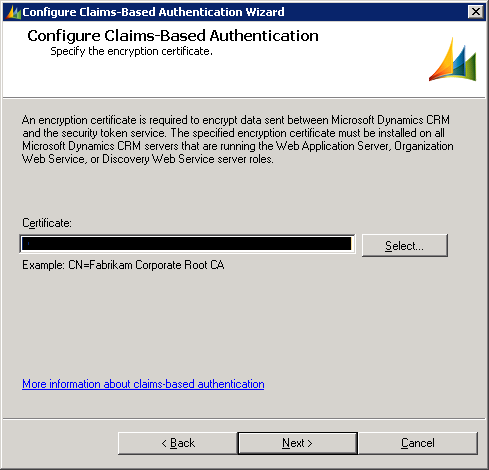
In MS Dynamics CRM things are perhaps simpler as there is no editing of the web.config file just a reconfiguration of Claims-Based Authentication (really, just run through the wizard as all other settings should already be correct):

1. Start the Deployment Manager:


2. Click Configure Claims-Based Authentication, which will launch the wizard and continue clicking next until the end of the Wizard.


3. Restart IIS.

Having done this, I was able to access my Dev environment again.

Monday, 20 January 2014

Turn off IE Compatibility mode in MS Dynamics CRM 2011 or why indexOf doesn't work.

We'd been having navigation issues in MS Dynamics CRM 2011 for a while: Mouse scrolling wouldn't work and double clicking was necessary to select anything from a drop down menu. The issue would disappear if IE was using IE 9 document standards. The problem was that IE would "downgrade" itself to IE 7.

Somewhat bizarrely this wasn't occurring everywhere, it was just occurring in one of our environments causing loads of headaches for everybody. The testers were annoyed that they had, effectively limited functionality and kept forgetting to set document standards to IE 9 via developer tools. We weren't sure why this was happening in only one environment.

Things came to a head last week when I used a variation of my function getAllUserRoles and due to indexOf only being supported on IE > 9, it was working everywhere apart from on this environment. 

It turns out that there is a setting, introduced in UR12, called Load Pages in the most recent version of Internet Explorer, which modifies the headers so that the pages are rendered in the most recent version of IE.

Navigate to Settings -> Administration -> System Settings -> Customization.


Ticking this setting, will ensure that the default doc standards will be used and the heat death of the universe will have been staved off for another tick or two.