I'm using a windows 2003 box as my primary domain controller and it took me the best part of 2 days to work it all out, as this is unlikely to be what Red Hat had in mind when setting this objective, I installed openLDAP and what a bundle of joy that turned out to be. I'll post how I did it at some other point.
Assuming, like the objective states that there is a working LDAP service then we can use a TUI tool (authconfig-tui) to configure this. There is of course a GUI tool (system-config-authentication) too, feel free to use it if you like it better or even the full on command authconfig.
Let's get started by installing the necessary packages:
yum install openldap{,-clients,-devel,}Now run the authconfig-tui tool:
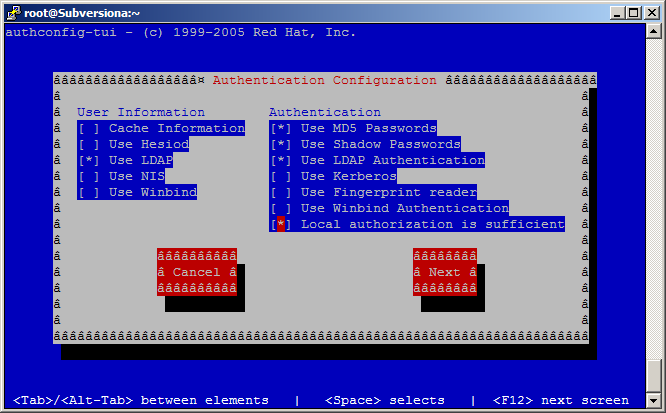

When you exit this tool, the System Security Services Daemon (sssd) and the local LDAP name service daemon (nslcd) should start, I say should because for some reason nslcd refused to start. Similarly, the /etc/nsswitch.conf file has sometimes the wrong configuration.
passwd: files sssYou need to change the above three lines to:
shadow: files sss
group: files sss
passwd: files ldapYou can now (re)start nslcd, needless to say that you should make sure that the services (sssd, nslcd) will run after a reboot (e.g. chkconfig nslcd on).
shadow: files ldap
group: files ldap
If you get the list of system users, you should now be able to see domain users:
getent passwdYou can check the domain users with this command to compare them with the output of the command above:
ldapsearch -xb "dc=domain,dc=com" "objectclass=account"I must say that this objective seems a little bit more complicated than the average objective. I might give authconfig a try to see if it is less fiddly.


