Showing posts with label ADFS. Show all posts

Monday, 21 September 2015

ID1073: A CryptographicException occurred when attempting to decrypt the cookie using the ProtectedData API (see inner exception for details).

A few weeks back, the performance testers found this issue when doing some resilience testing:
ID1073: A CryptographicException occurred when attempting to decrypt the cookie using the ProtectedData API (see inner exception for details). If you are using IIS 7.5, this could be due to the loadUserProfile setting on the Application Pool being set to false.
In essence, if the user started his session on server 1, then that server was stopped, when he connected to server 2, the issue would occur. Annoyingly, this would require removing cookies, which our testers are not able to do, on their locked down machines.

The deployment uses an NLB flag was checked for this deployment, but this seemed to make no difference, so we decided to encrypt the cookies using a certificate rather than the machine key.

This is a bit annoying as there are few things to consider:
  1. We're going to have to modify the MS Dynamics CRM web.config, which means that every new patch, update, etc.. might overwrite it.
  2. Following from that we need a deployment script to automate it as much as possible.
  3. We'll need to store a way to id the certificate to be used for the encryption somewhere easily accessible (We could hard code it but then when the certificate expires we'd been in trouble).
I decided to use the registry for 3.

This is the code that we've used to encrypt the cookies with a certificate.

using Microsoft.IdentityModel.Tokens;
using Microsoft.IdentityModel.Web;
using Microsoft.Win32;
using System;
using System.Collections.Generic;
using System.Linq;
using System.Security.Cryptography.X509Certificates;
using System.Text;
using System.Threading.Tasks;

namespace CRM.RSASessionCookie
{
    /// <summary>
    /// This class encrypts the session security token using the RSA key
    /// of the relying party's service certificate.
    /// </summary>
    public class RsaEncryptedSessionSecurityTokenHandler : SessionSecurityTokenHandler
    {
        static List<CookieTransform> transforms;

        static RsaEncryptedSessionSecurityTokenHandler()
        {            
            string certThumbprint = (string)Registry.GetValue(@"HKEY_LOCAL_MACHINE\SOFTWARE\Microsoft\MSCRM",
                "CookieCertificateThumbprint",
                null);

            if (!string.IsNullOrEmpty(certThumbprint))
            {
                X509Certificate2 serviceCertificate = CertificateUtil.GetCertificate(StoreName.My,
                                                         StoreLocation.LocalMachine, certThumbprint);

                if (serviceCertificate == null)
                {
                    throw new ApplicationException(string.Format("No certificate was found with thumbprint: {0}", certThumbprint));
                }

                transforms = new List<CookieTransform>() 
                         { 
                             new DeflateCookieTransform(), 
                             new RsaEncryptionCookieTransform(serviceCertificate),
                             new RsaSignatureCookieTransform(serviceCertificate),
                         };
            }
            else
            {
                throw new ApplicationException(
                @"Could not read Registry Key: HKEY_LOCAL_MACHINE\SOFTWARE\Microsoft\MSCRM\CookieCertificateThumbprint.\nPlease ensure that the key exists and that you have permission to read it.");
            }
        }

        public RsaEncryptedSessionSecurityTokenHandler()
            : base(transforms.AsReadOnly())
        {
        }
    }

    /// <summary>
    /// A utility class which helps to retrieve an x509 certificate
    /// </summary>
    public class CertificateUtil
    {
        /// <summary>
        /// Gets an X.509 certificate given the name, store location and the subject distinguished name of the X.509 certificate.
        /// </summary>
        /// <param name="name">Specifies the name of the X.509 certificate to open.</param>
        /// <param name="location">Specifies the location of the X.509 certificate store.</param>
        /// <param name="thumbprint">Subject distinguished name of the certificate to return.</param>
        /// <returns>The specific X.509 certificate.</returns>
        public static X509Certificate2 GetCertificate(StoreName name, StoreLocation location, string thumbprint)
        {
            X509Store store = null;
            X509Certificate2Collection certificates = null;           
            X509Certificate2 result = null;

            try
            {
                store = new X509Store(name, location);
                store.Open(OpenFlags.ReadOnly);
                //
                // Every time we call store.Certificates property, a new collection will be returned.
                //
                certificates = store.Certificates;

                for (int i = 0; i < certificates.Count; i++)
                {
                    X509Certificate2 cert = certificates[i];

                    if (cert.Thumbprint.Equals(thumbprint, StringComparison.InvariantCultureIgnoreCase))
                    {
                        result = new X509Certificate2(cert);
                        break;
                    }
                }                
            }
            catch (Exception ex)
            {
                throw new ApplicationException(string.Format("An issue occurred opening cert store: {0}\\{1}. Exception:{2}.", name, location, ex));
            }
            finally
            {
                if (certificates != null)
                {
                    for (int i = 0; i < certificates.Count; i++)
                    {
                        X509Certificate2 cert = certificates[i];
                        cert.Reset();
                    }
                }

                if (store != null)
                {
                    store.Close();
                }
            }

            return result;
        }
    }
}

Company standards dictate that this class should be deployed to GAC but it can be deployed to the CRM webpage bin folder instead.

This is the PowerShell function in our script that sets the certificate on the registry:

function SetCookieCertificateThumbprint
{
 param ([string]$value)
 $path = "hklm:\Software\microsoft\mscrm"
 $name = "CookieCertificateThumbprint"
 
 if( -not (Test-Path -Path $path -PathType Container) )
 {
  Write-Error "Cannot find MSCRM Registry Key: " + $path
 }
 else
 {
  $keys = Get-ItemProperty -Path $path

  if ($keys.$name -or $keys.$name -ne $value)
  {
   Set-ItemProperty -path $path -name $name -value $value 
  }
 }
}

I have not automated the rest, which is the really fiddly part, i.e. updating the web.config. Here are the relevant parts though:

Config Sections First:
<configSections>
    <!-- COMMENT:START CRM Titan 28973
   If you add any new section here , please ensure that section name is removed from help/web.config
End COMMENT:END-->
    <section name="crm.authentication" type="Microsoft.Crm.Authentication.AuthenticationSettingsConfigurationSectionHandler, Microsoft.Crm.Authentication, Version=6.0.0.0, Culture=neutral, PublicKeyToken=31bf3856ad364e35" />
    <section name="microsoft.identityModel" type="Microsoft.IdentityModel.Configuration.MicrosoftIdentityModelSection, Microsoft.IdentityModel, Version=3.5.0.0, Culture=neutral, PublicKeyToken=31bf3856ad364e35" />
  </configSections>
The actual token handler:
<microsoft.identityModel>
  <service>   
    <securityTokenHandlers>
      <!-- Remove and replace the default SessionSecurityTokenHandler with your own -->
      <remove type="Microsoft.IdentityModel.Tokens.SessionSecurityTokenHandler, Microsoft.IdentityModel, Version=3.5.0.0, Culture=neutral, PublicKeyToken=31bf3856ad364e35" />
      <add type="CRM.RSASessionCookie.RsaEncryptedSessionSecurityTokenHandler, CRM.RSASessionCookie, Version=1.0.0.0, Culture=neutral, PublicKeyToken=d10ca3d28ba8fa6e" />
    </securityTokenHandlers>
  </service>
</microsoft.identityModel>

It should, hopefully be obvious that this will need to be done across all CRM servers that have the Web Server role.

After all this work, we thought we would be ok for our dev and test environments sharing a single ADFS server, as the cookies would be encrypted with the same certificate, but it turns out that this is not supported by MS Dynamics CRM 2013 :(

Monday, 14 September 2015

Disabling Autocomplete for ADFS forms sign in page

We've been asked to disable Autocomplete for the sign in page on our MS Dynamics CRM application. We have a sign-in page because we're using IFD.

This turns out to require an unsupported customization of ADFS, as we're using ADFS 2.1, which really doesn't support any customization at all.

Unsupported here, simply means that a patch might overwrite our changes or the page might change completely, no big deal in this case, as it's unlikely that many changes will be rolled out for ADFS 2.1, but it pays to be careful when doing unsupported customization.

Most of our users use IE 9, which means that autocomplete=off will work, however, some of our users don't, which means that we have to have a new solution.

We're are modifying the FormsSignIn.aspx page. This page can normally be found in c:\inetpub\wwwroot\ls\, but it really does depend on how ADFS is installed.

I've done this in a rather verbose way, first the JavaScript functions:

function EnablePasswordField(){
    document.getElementById('<%=PasswordTextBox.ClientID%>').readOnly=false;         
    document.getElementById('<%=PasswordTextBox.ClientID%>').select();
}

function DisablePasswordField(){
    document.getElementById('<%=PasswordTextBox.ClientID%>').readOnly=true;     
}

and then the markup:
<asp:TextBox runat="server" ID="PasswordTextBox" TextMode="Password" onfocus="EnablePasswordField()" onblur="DisablePasswordField()" ReadOnly="true" autocomplete="off"></asp:TextBox>

The key here is to make the password textbox readonly and use the JavaScript functions to make the control writable on focus and readonly when it loses focus, this seems to be enough to thwart autocomplete, for now at least.

This is the complete page:

<%@ Page Language="C#" MasterPageFile="~/MasterPages/MasterPage.master" AutoEventWireup="true" ValidateRequest="false"
    CodeFile="FormsSignIn.aspx.cs" Inherits="FormsSignIn" Title="<%$ Resources:CommonResources, FormsSignInPageTitle%>"
    EnableViewState="false" runat="server" %>

<%@ OutputCache Location="None" %>

<asp:Content ID="FormsSignInContent" ContentPlaceHolderID="ContentPlaceHolder1" runat="server">
        <script>
        
            function EnablePasswordField(){
               document.getElementById('<%=PasswordTextBox.ClientID%>').readOnly=false;
            }
            
   function DisablePasswordField(){
               document.getElementById('<%=PasswordTextBox.ClientID%>').readOnly=true;     
            }
        </script>
    <div class="GroupXLargeMargin">
        <asp:Label Text="<%$ Resources:CommonResources, FormsSignInHeader%>" runat="server" /></div>
    <table class="UsernamePasswordTable">
        <tr>
            <td>
                <span class="Label">
                    <asp:Label Text="<%$ Resources:CommonResources, UsernameLabel%>" runat="server" /></span>
            </td>
            <td>
                <asp:TextBox runat="server" ID="UsernameTextBox" autocomplete="off"></asp:TextBox>
            </td>
            <td class="TextColorSecondary TextSizeSmall">
                <asp:Label Text="<%$ Resources:CommonResources, UsernameExample%>" runat="server" />
            </td>
        </tr>
        <tr>
            <td>
                <span class="Label">
                    <asp:Label Text="<%$ Resources:CommonResources, PasswordLabel%>" runat="server" /></span>
            </td>
            <td>
                 <asp:TextBox runat="server" ID="PasswordTextBox" TextMode="Password" onfocus="EnablePasswordField()" onblur="DisablePasswordField()" ReadOnly="true" autocomplete="off"></asp:TextBox>
            </td>
            <td>&nbsp;</td>
        </tr>
        <tr>
            <td></td>
            <td colspan="2" class="TextSizeSmall TextColorError">
                <asp:Label ID="ErrorTextLabel" runat="server" Text="" Visible="False"></asp:Label>
            </td>
        </tr>
        <tr>
            <td colspan="2">
                <div class="RightAlign GroupXLargeMargin">
                    <asp:Button ID="SubmitButton" runat="server" Text="<%$ Resources:CommonResources, FormsSignInButtonText%>" OnClick="SubmitButton_Click" CssClass="Resizable" />
                </div>
            </td>
            <td>&nbsp;</td>
        </tr>
    </table>
</asp:Content>

Monday, 17 August 2015

The authentication endpoint Kerberos was not found on the configured Secure Token Service! - Redux

So today I had an interesting moment of Deja vu today, where we started getting this issue again.

This time though, the configuration had already been done so it was a bit mystifying to say the least and to further add to the confusion, it worked on one server but not the other.

After a lot of blood, sweat and tears the issue was tracked down to the affected server being unable to communicate with the ADFS load balancer. In essence, our network guys had not opened the firewall for both servers but just one of them.

So, if you get this issue, it might simply be due to a good old fashioned network issue.

Tuesday, 26 May 2015

Create Relying Party Trust for Microsoft Dynamics CRM from Powershell

I've configured Claims based authentication and IFD for MS Dynamics CRM more times than I care to remember and every time I do it manually, on the basis that it just doesn't take that long, which is true but it's also very tedious, so I spent some time creating a script to create the Relying Party Trust needed for MS Dynamics CRM claims based authentication and IFD to work. Obligatory XKCD.

I've only tried this script with ADFS 3.0 and MS Dynamics CRM 2015, but it should work for MS Dynamics CRM 2013 as well.

It's also possible to pass a file with the claims, using the IssuanceTransformRulesFile and IssuanceAuthorizationRules flags instead for the Add-AdfsRelyingPartyTrust command.

The script should be run after MS Dynamics CRM has been configured for Claims based authentication from the ADFS server.

The script can be also used to create the Relying Party trust for an Internet Facing Deployment and again it needs to be run after IFD has been configured in MS Dynamics CRM.

param ([string]$Name, [string]$Identifier)

if (-not ([Security.Principal.WindowsPrincipal] [Security.Principal.WindowsIdentity]::GetCurrent()).IsInRole([Security.Principal.WindowsBuiltInRole] "Administrator"))
{
    Write-Warning "You do not have Administrator rights to run this script!`nPlease re-run this script as an Administrator!"
    break
}

if (-not($Name))
{
 Write-Host "Name is a mandatory parameter. This should be the name of the Relying Party Trust"
 break
}

if (-not($Identifier))
{
 Write-Host "Identifier is a mandatory parameter. This will normally be of the form: https://<fqdn crm>/"
 break
}

$Identifier = $Identifier.Trim("/")

#These are the Transform Rules needed for CRM to work.
$transformRules='@RuleTemplate = "PassThroughClaims"
@RuleName = "Pass through UPN"
c:[Type == "http://schemas.xmlsoap.org/ws/2005/05/identity/claims/upn"]
 => issue(claim = c);

@RuleTemplate = "PassThroughClaims"
@RuleName = "Pass through primary SID"
c:[Type == "http://schemas.microsoft.com/ws/2008/06/identity/claims/primarysid"]
 => issue(claim = c);

@RuleTemplate = "MapClaims"
@RuleName = "Transform Windows Account name to Name"
c:[Type == "http://schemas.microsoft.com/ws/2008/06/identity/claims/windowsaccountname"]
 => issue(Type = "http://schemas.xmlsoap.org/ws/2005/05/identity/claims/name", Issuer = c.Issuer, OriginalIssuer = c.OriginalIssuer, Value = c.Value, ValueType = c.ValueType);'

#A single Authorization Rule, i.e. let everybody thru. Could tie down further if needed.
$authRules='@RuleTemplate = "AllowAllAuthzRule"
 => issue(Type = "http://schemas.microsoft.com/authorization/claims/permit",
Value = "true");'

#Copied and pasted this from a CRM 2011/ADFS 2.1 RPT
$imperRules ='c:[Type =="http://schemas.microsoft.com/ws/2008/06/identity/claims/primarysid", Issuer =~"^(AD AUTHORITY|SELF AUTHORITY|LOCAL AUTHORITY)$" ] => issue(store="_ProxyCredentialStore",types=("http://schemas.microsoft.com/authorization/claims/permit"),query="isProxySid({0})", param=c.Value );c:[Type == "http://schemas.microsoft.com/ws/2008/06/identity/claims/groupsid",Issuer =~ "^(AD AUTHORITY|SELF AUTHORITY|LOCAL AUTHORITY)$" ] => issue(store="_ProxyCredentialStore",types=("http://schemas.microsoft.com/authorization/claims/permit"),query="isProxySid({0})", param=c.Value );c:[Type =="http://schemas.microsoft.com/ws/2008/06/identity/claims/proxytrustid", Issuer=~ "^SELF AUTHORITY$" ] => issue(store="_ProxyCredentialStore",types=("http://schemas.microsoft.com/authorization/claims/permit"),query="isProxyTrustProvisioned({0})", param=c.Value );'

Add-AdfsRelyingPartyTrust -Name $Name -Identifier $Identifier -IssuanceTransformRules $transformRules -IssuanceAuthorizationRules $authRules -ImpersonationAuthorizationRules $imperRules

Set-AdfsRelyingPartyTrust -TargetName $Name -MetadataUrl $($Identifier + "/FederationMetadata/2007-06/FederationMetadata.xml") -MonitoringEnabled $true -AutoUpdateEnabled $true

Update-ADFSRelyingPartyTrust -TargetName $Name
This is what I ran to create the relying party trust for Claims based authentication:

 .\CRMRPT.ps1 -Name "crm2015 - CBA" -Identifier "https://crm2015.dev.local/" 

and this tocreate the relying party trust for IFD:

 .\CRMRPT.ps1 -Name "crm2015 - IFD" -Identifier "https://auth.dev.local/"

Monday, 14 July 2014

The authentication endpoint Kerberos was not found on the configured Secure Token Service!

We finally managed to overcome all issues and deployed the build to the OAT environment and it went: KABOOM!!!
Unable to get item. Exception: System.NotSupportedException: The authentication endpoint Kerberos was not found on the configured Secure Token Service! at Microsoft.Xrm.Sdk.Client.IssuerEndpointDictionary.GetIssuerEndpoint(TokenServiceCredentialType credentialType) at Microsoft.Xrm.Sdk.Client.AuthenticationCredentials.get_IssuerEndpoint() at Microsoft.Xrm.Sdk.Client.ServiceConfiguration`1.AuthenticateInternal(AuthenticationCredentials authenticationCredentials) at Microsoft.Xrm.Sdk.Client.ServiceConfiguration`1.AuthenticateFederationInternal(AuthenticationCredentials authenticationCredentials) at Microsoft.Xrm.Sdk.Client.ServiceConfiguration`1.Authenticate(AuthenticationCredentials authenticationCredentials) at Microsoft.Xrm.Sdk.Client.ServiceConfiguration`1.Authenticate(ClientCredentials clientCredentials) at Microsoft.Xrm.Sdk.Client.OrganizationServiceConfiguration.Authenticate(ClientCredentials clientCredentials) at Microsoft.Xrm.Sdk.Client.ServiceProxy`1.AuthenticateClaims() at Microsoft.Xrm.Sdk.Client.ServiceProxy`1.AuthenticateCore() at Microsoft.Xrm.Sdk.Client.ServiceProxy`1.Authenticate() at Microsoft.Xrm.Sdk.Client.ServiceProxy`1.ValidateAuthentication() at Microsoft.Xrm.Sdk.Client.ServiceContextInitializer`1.Initialize(ServiceProxy`1 proxy) at Microsoft.Xrm.Sdk.Client.OrganizationServiceProxy.RetrieveMultipleCore(QueryBase query) at Microsoft.Xrm.Sdk.Client.OrganizationServiceProxy.RetrieveMultiple(QueryBase query) at Consumer.ItemManager.RetrieveLastItem(String type) at
Consumer.ItemManager.RetrieveLastItem(String type) at
Consumer.Service.ConsumerService.Process[T](Config feed)

I thought that the Kerberos endpoint must not be enabled in ADFS, but it was and after a bit of investigating, it turns out that this is a known issue in MS Dynamics CRM 2011/13.

The interesting bit about this issue is that the front end was working fine, but trying to use the SDK in any way was not working.

The MEX endpoint that gets set when Claims Based Authentication is configured is like this:
https://adfs.domain.com/adfs/ls/mex
This is a bit of a problem, as it doesn't exist :(

The Working MEX endpoint is:
https://adfs.domain.com/adfs/services/trust/mex
Microsoft have kindly provided a PowerShell script to rectify this issue:

Save this as UpdateMEXEndpoint.ps1

Param (
     #optional params
     [string]$ConfigurationEntityName="FederationProvider",
     [string]$SettingName="ActiveMexEndpoint",
     [object]$SettingValue,
     [Guid]$Id
 )
 $RemoveSnapInWhenDone = $False
 
 if (-not (Get-PSSnapin -Name Microsoft.Crm.PowerShell -ErrorAction SilentlyContinue))
 {
     Add-PSSnapin Microsoft.Crm.PowerShell
     $RemoveSnapInWhenDone = $True
 }
 
 $Id=(Get-CrmAdvancedSetting -ConfigurationEntityName FederationProvider -Setting ActiveMexEndpoint).Attributes[0].Value
 
 $setting = New-Object "Microsoft.Xrm.Sdk.Deployment.ConfigurationEntity"
 $setting.LogicalName = $ConfigurationEntityName
 if($Id) { $setting.Id = $Id }
 
 $setting.Attributes = New-Object "Microsoft.Xrm.Sdk.Deployment.AttributeCollection"
 $keypair = New-Object "System.Collections.Generic.KeyValuePair[String, Object]" ($SettingName, $SettingValue)
 $setting.Attributes.Add($keypair)
 
 Set-CrmAdvancedSetting -Entity $setting
 
 if($RemoveSnapInWhenDone)
 {
     Remove-PSSnapin Microsoft.Crm.PowerShell
 }

This can then be used to modify the relevant setting:

UpdateMEXEndpoint.ps1 –SettingValue “https://<ADFS STSHOST>/adfs/services/trust/mex”

An alternative to use this script is updating the FederationProvider table in the MSCRM_Config database, but this is not supported.

Tuesday, 1 July 2014

ADFS Sign-in Page Url

Another happy day messing about with ADFS, another day I needed this, so here it goes:
https://<ADFS FQDN>/adfs/ls/IdpInitiatedSignon.aspx
where <ADFS FQDN> is the FQDN of your ADFS server or VIP's DNS entry.

Monday, 30 June 2014

Configure Federation Trust for Claim Based authentication in Ms Dynamics CRM 2013 using ADFS 3.0 ( Windows Server 2012 R2) part 3

In part 1, I described how to install and configure ADFS on a Windows 2012 R2 server. In part 2, I described how to configure Ms Dynamics CRM 2013 to use claim based authentication and in this final post of this series I configure a federation trust to allow users from a separate forest to access MS Dynamics CRM 2013.
 
In our case, this is due to an acquisition, so that we are hosting Dynamics CRM in a domain called dev.local and the company bought has their own domain called taleb.local.
 
The objective is to allow users from taleb.local to log on, with their taleb.local accounts into our instance of Dynamics CRM, so we could say that taleb.local is the Accounts domain and dev.local is the Dynamics Domain.
 
Pre-Requisites:
  • Working ADFS servers on both domain/forests
  • Name resolution working between domain/forests as well as inside forests, I have used stub zones but any way that works for you is good.
  • TCP port 443 between ADFS servers and Dynamics Servers(or at least Front End Servers) open.
  • Account with permissions to configure both ADFS servers.
 
In our case, due to the internal use, Public certificates are not in use, so the first step is to ensure that taleb.local machines trust the dev.local CA. This is out of scope for this post, see this link for details.
 
The ADFS server(s) in dev.local need to trust the taleb.local CA, which can be achieved by adding the certificate to the trusted store for the computer account.
 
On the Accounts domain's (taleb.local) ADFS server, add a Relying Party Trust for the dev.local ADFS endpoint:


When the Claim Rules window opens, Click add Rule and Add a Send LDAP Attribute as Claims Claim Rule. The only LDAP Attribute that we are after is UPN.


On the Dynamics domain's (dev.local) ADFS Server, Add a Claims Provider Trust for the Accounts domain (taleb.local) ADFS endpoint:


When the Claim Rules window opens, Click add Rule and Add a Pass Through or Filter an Incoming Claim Claim Rule. I think that we only really need UPN, but I've added Windows Account Name and Primary SID as well for good measure.


At this point, all that remains is for accounts from the Accounts domain (taleb.local) to be added to Dynamics CRM as users and given a role so that they can log in to Dynamics CRM.
 
Ensure that UPN is used to add a new user to Dynamics CRM, e.g. For a user with logon: taleb\NN, the username in Dynamics CRM would be: nn@taleb.local. Annoyingly, it doesn't retrieve first name, last name so these will need to be added manually. I'd love to know if it's actually possible (to get the first/last name to auto populate) by adding more claims but I've never been able to get it working.
 
I've added both domains to the trusted sites as our default configuration is for automatic logon with current username and password on trusted sites.
 

Navigating to https://allinone.dev.local/lospolloshermanos/main.aspx from a machine in the accounts domain (taleb.local) brings this screen up: 


Selecting sts1.taleb.local will redirect to https://allinone.dev.local/lospolloshermanos/main.aspx with the current account from the accounts domain (taleb.local).


Monday, 26 May 2014

Configure Claim Based authentication in Ms Dynamics CRM 2013 using ADFS 3.0 ( Windows Server 2012 R2) part 2

On part 1, I described how to install and configure ADFS on a Windows 2012 R2 server and in this post I will describe how to configure Ms Dynamics CRM 2013 to use claim based authentication.

Pre-Requisite:
  • A wildcard certificate with private key installed.
The first step is to ensure that the Ms Dynamics CRM 2013 website is configured to use HTTPS, so from the IIS Manager (Windows Key + R -> inetmgr):

Add New Binding
Note that IIS will display the certificate friendly name here, you can always click view to ensure that you have the correct certificate here.

Click Ok and then Click Close.
Ms Dynamics CRM 2013 should now be available on HTTPS :)

Now we need to ensure that the service account for the CRM website, i.e. the account that run CRMAppPool, has access to the private key of the wildcard certificate, so from a certificate console  (Windows Key + R -> mmc -> ctrl + M -> Certificates -> Computer Account):


Note how because I'm using Network Service to run the CRMAppPool, that is the account that needs to be able to read the private key.

The next step is to configure Ms Dynamics CRM 2013 for Claim based authentication.
First we need to ensure that the binding type is set to HTTPS.

From the Deployment Manager.


Set Binding Type to HTTPS (There is no need to have the port number)


Make sure you that you click Apply.

Click on Configure Claim Based Authentication and follow the wizard.


It is possible to copy the URL for the relying party by opening the log file and scrolling down to the bottom of the file.
From the ADFS server, start the ADFS Management Console (Server Manager -> Tools -> AD FS Management). We need to ensure that Forms Authentication will be allowed from the internal network. Click on Authentication Policies, then on Edit.


Tick Forms Authentication and click Ok.


 A claim rule is needed to obtain the UPN from the Active Directory domain, so from Claim Provider Trust, select Active Directory and click on Edit Claim Rules..


Click Add Rule


We are now ready to add a relying party trust, so on the Relying Party Trust menu, click on Add Relying Party Trust.


Note how this is the URL the Claims Based authentication wizard tells us to use for configuring a relying trust, it's https://<FQDN>/FederationMetadata/2007-06/FederationMetadata.xml.


Once the wizard completes (just click Next until you get to the end), it is necessary to add three Issuance Transform Rules.

A Pass Through Rule for UPN:


A Pass Through Rule for Primary SID:


A Transform  Rule for Windows Account Name:


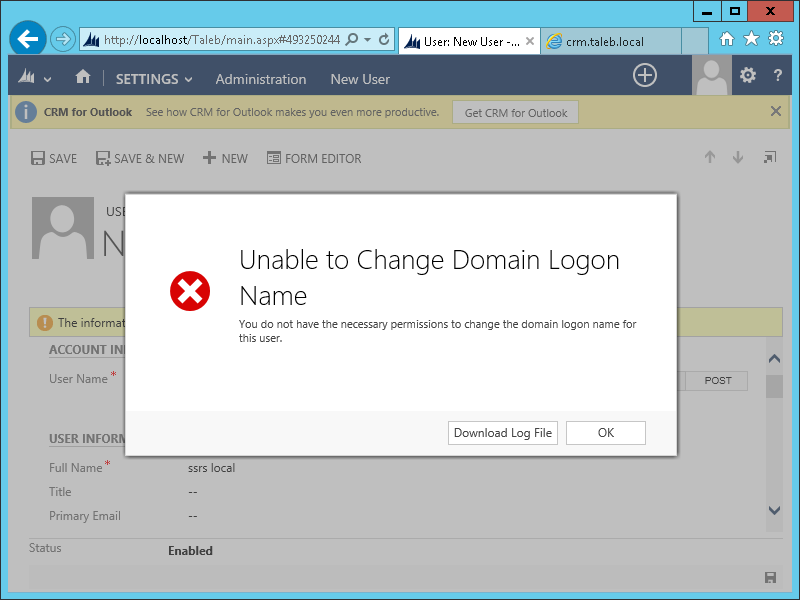
At this point I hit another snag. I tried to add a new user with UPN format, e.g. sts@taleb.local and I had this error:

The solution was to turn Auto Group Management Off, which is done via a registry key:

HKEY_LOCAL_MACHINE\SOFTWARE\Microsoft\MSCRM\AutoGroupManagementOff

Default value is 0, i.e. Auto Group Management is On

It can be turned off by setting it to 1.
Having done this, I was able to add a new user in UPN format and successfully sign in: