Monday, 24 September 2018

Azure Cognitive Services and Dynamics 365 - Part 1

Microsoft Cognitive Services is a collection of APIs, which can be used to add artificial intelligence capabilities into applications. You can see see the full list here and play with the demos by clicking on the links therein.

Important

At the time of writing, the integration of Cognitive Services with Dynamics 365 is in preview mode and the preview is only available for North American instances.


1. Activate Text Analytics

In order to enable the integration follow these steps:

  1. Navigate to Settings | Administration | System Settings
  2. Go to Preview tab
  3. Select Yes on Enable the Dynamics 365 Text Analytics Preview
  4. Click OK
2. Create Text Analytics Endpoint in Azure

We need to create a Text Analytics service in Azure:
  1. Login to Azure Portal
  2. Click Create a resource
  3. Search for Text Analytics
  4. Click Create, which will take you to the wizard (of sorts)
  5. Fill in:
    • Name
    • Subscription
    • Location
    • Pricing Tier
    • Resource Group
Once the resource has been created we will need endpoint URL and an access key to access it from Dynamics 365, which we can get from the resource itself on the azure portal, as shown below:


3. Configure Dynamics 365 to use Text Analytics

The final configuration step is to add the details from section 2 to Dynamics 365.
  1. Navigate to Settings | Administration | Azure Machine Learning Text Analytics Service Configuration
  2. Fill in with details from the previous section: 
    • Azure Service Url
    • Azure Account Key
  3. Click Test Connection
  4. Click Activate
  5. Tick Activate existing text analytics models and Click Activate
Note that the results of Test Connection will be displayed on the Connection Test Information section.

4A. Create Knowledge Search Model
  1. Navigate to Settings | Service Management | Knowledge Search Field Settings
  2. Click New
  3. Fill in details
  4. Click Save
4B. Create Keyword or Key phrase Determination Field

On the same record as section 4A, we click the plus sign as shown below and we add some rules

The rules determine which fields will be used to generate the default search strings for Knowledge Based articles.

In the example below we  have set up, perhaps somewhat redundantly the subject of regarding Tasks, Activities, the case description field and the title of any regarding notes as relevant keywords/phrases.


5. Add Knowledge Base Search Suggestions to Case

  1. Navigate to Settings | Customizations | Customize the System
  2. Expand Entities | Case | Form
  3. Click on the Default Form: Case
  4. Double Click on the Conversation Tab
  5. Go to Web Client Properties | Knowledge Base Search
  6. On Additional Options, tick Turn on Automatic Suggestions 
  7. On Give knowledge base (KB) suggestions using, ensure you select Text Analytics
  8. Save Form
  9. Publish Entity.
6. Testing it

The feature will use Text Analytics to extract meaningful keywords to search for from the fields set up on section 4B

As mentioned on section 4B, in this example we  have set up,  the subject of Tasks, Activities, the case description field and the title of any notes as relevant keywords/phrases.

So in an example case, where we have a description and a task like this:


If we click on KB Records this is the result


It's used the fields to suggest the search words

I have to admit that I expected it to search the KB articles, but this is not what the feature is about.


7. Enable Knowledge Management on Other Entity

It is possible to do the same for pretty much any entity

  1. Navigate to Settings | Customizations | Customize the System
  2. Expand Entities | Account 
  3. Tick Knowledge Management
  4. Click on the Default Form: Account
  5. Add Knowledge Base Search
  6. On Additional Options, tick Turn on Automatic Suggestions 
  7. On Give knowledge base (KB) suggestions using, ensure you select Text Analytics
  8. Click Ok
  9. Save Form
  10. Publish Entity.
We will then need to create a Knowledge Search Model as per section 4.

Thursday, 20 September 2018

Visual Studio 2015, Git, Aurelia and case Sensitiveness

The support team was complaining today that they couldn't reset user passwords anymore, which was surprising.

After a bit of digging there was this really useful error

Unhandled rejection (SystemJS) Template markup must be wrapped in a <template> element e.g. <template> <!-- markup here --> </template> Error: Template markup must be wrapped in a <template> element e.g. <template> <!-- markup here --> </template>
and a more useful part

Error loading https://....../dist/main/user/resetPasswordDialog.html!template-registry-entry

The issue is that there is discrepancy in case for the first letter of the view, so that it's looking for this:

main/user/resetPasswordDialog.html

but we actually have this:

main/user/ResetPasswordDialog.html


Simple error to fix, right?

This is where things get interesting.

Git's client on Visual Studio 2015 would not recognise the change of case on the file name as a change and thus I had a bit of a problem.

I tried making changes to the file to force the change but to no avail, in the end and to cut a long story short, it turns out that I could change the case directly on Visual Studio Team Services or should I say Azure DevOps?

In any case, I suppose this is a Windows thing  but it was very annoying as I thought I might need to get creative, e.g. spin up a Linux VM and clone the repo ...


Monday, 10 September 2018

Validation Travails with Aurelia-Validation

One of our testers finally got a chance to have a look at our Aurelia App, which is extremely rare and she found an issue where validation would not apply under certain conditions.

After a little bit of investigating, the conditions turned out to be editing ... sigh

This is the code:

import { ValidationController, validateTrigger, ValidationRules, ValidationError } from 'aurelia-validation';
import { BootstrapFormRenderer } from '../../validation/bootstrapFormRenderer'
import { stuff here } from ...
import { inject, NewInstance, computedFrom, BindingEngine } from 'aurelia-framework';
import { Router } from 'aurelia-router';
import { AuthService } from 'aurelia-authentication'


@inject(BindingEngine, NewInstance.of(ValidationController), Router, AuthService)
export class AddEditUser {
    private User this.user;

    constructor(bindingEngine: BindingEngine, validationController: ValidationController, router: Router, authService: AuthService) {
        this.bindingEngine = bindingEngine;        
        this.router = router;
        this.authService = authService;
        this.validationController = validationController;
        this.validationController.validateTrigger = validateTrigger.changeOrBlur;
        this.validationController.addRenderer(new BootstrapFormRenderer());
        this.user = new User();
    }

    activate(params, navigationInstruction) {
        this.editMode = Object.keys(params).length > 0;

        if (this.editMode) {
            this.service.find(params.id).then(user => {
                this.user = new User(user.Id,
                    user.FirstName,
                    user.MiddleName,
                    user.LastName,
                    user.Email,
                    user.UserName,
                    user.JobRole,
                    user.PhoneNumber,
                    user.UserRole,
                    user.ContactPreference,
                    null,
                    null,
                    user.Status);

            });
        } 
    }

    bind() {       

        ValidationRules
            .ensure("userName").required().maxLength(256).matches(/^[a-z0-9@\.\-\_]+$/i).withMessage("User Name can be up to 256 characters long. Only alphanumeric characters and . _ - @ are allowed.")
            .ensure("firstName").required().maxLength(64).matches(/^([a-zA-Z\'\-\s])+$/i).withMessage("First Name can be up to 64 characters long. Only letters, apostrophes, hyphens and spaces are allowed.")
            .ensure("middleName").maxLength(64).matches(/^([a-zA-Z\'\-\s])+$/i).withMessage("Middle Name can be up to 64 characters long. Only letters, apostrophes, hyphens and spaces are allowed.")
            .ensure("lastName").required().maxLength(64).matches(/^([a-zA-Z\'\-\s])+$/i).withMessage("Last Name can be up to 64 characters long. Only letters, apostrophes, hyphens and spaces are allowed.")            
            .ensure("email").email().withMessage("Provide a valid Email.").maxLength(256)
            .ensure("email").required().when((user: User) => user.contactPreference === ContactPreferenceType.Email).withMessage("Email is required when it's your contact preference")
            .ensure("phoneNumber").minLength(10).maxLength(12).matches(/^\d+$/).withMessage("Provide a valid Phone number. Only numbers allowed")
            .ensure("phoneNumber").required().when((user: User) => user.contactPreference === ContactPreferenceType.SMS).withMessage("Phone number is required when it's your ontact preference")
            .ensure("status").required()
            .ensure("role").required()
            .on(this.user);
    }

    public saveUser() {

        this.validationController.validate()

            .then((errors: ValidationError[]) => {
                if (errors.length === 0) {

                    this.service.update(this.user.userName, this.user.firstName, this.user.middleName, this.user.lastName,
                        this.user.email, this.user.phoneNumber, this.user.contactPreference, this.selectedTeam.id, this.selectedOrganization.id,
                        this.user.jobRole, this.user.status, this.user.role).then(result => {
                            this.userUpdated = true;
                            this.navigateBack();
                        }).catch(error => {
                            console.log(error);
                            this.failedToUpdateUser = true;
                        });
                }
            });
    }

    public addUser() {
        this.validationController.validate()
            .then((errors: ValidationError[]) => {
                if (errors.length === 0) {
                    this.service.register(this.user.userName, this.user.firstName, this.user.middleName, this.user.lastName,
                        this.user.email, this.user.phoneNumber, this.user.contactPreference, this.selectedTeam.id, this.selectedOrganization.id,
                        this.user.jobRole, this.user.status, this.user.role).then(result => {
                            this.userAdded = true;
                            this.navigateBack();
                        }).catch(error => {
                            console.log(error);
                            this.failedToAddUser = true;
                        });
                }
            });
    }

    public submit() {

        if (this.editMode) {
            return this.saveUser();
        }

        return this.addUser();
    }

}

And this is what I did to get it working, namely add the rules to the object after the object (user) was created.

activate(params, navigationInstruction) {
        this.editMode = Object.keys(params).length > 0;

        if (this.editMode) {
            this.service.find(params.id).then(user => {
                this.user = new User(user.Id,
                    user.FirstName,
                    user.MiddleName,
                    user.LastName,
                    user.Email,
                    user.UserName,
                    user.JobRole,
                    user.PhoneNumber,
                    user.UserRole,
                    user.ContactPreference,
                    null,
                    null,
                    user.Status);
                this.bind()
            });
        } 
    }

I tried this too but it made no difference, on the saveUser method.

this.validationController.addObject(this.user);

Tuesday, 10 July 2018

Azure On-premise Backup on Windows 2008 R2

We have one server that runs Windows 2008 R2 still, too long to explain, and we've recentely decided to move our backups to Azure.

I had no issues on Windows 2016 or 2012 but the backups would not run on Windows 2008 R2 unless Backup Now was click, which is not exactly what one wants from a backup solution.

A scheduled task is created/amended every time you set backup schedule, which is reasonable enough, but the problem that I had was that the task was not working.

This is the task in question


Program/Script:

C:\Windows\system32\windowspowershell\v1.0\powershell.exe

Add Arguments (optional):

-command Import-Module MSOnlineBackup; Start-OBBackup -Name "2cdeaf83-dead-c0de-beef-c345bead15b1
When I tried to run this on powershell, I got this error:

Import-Module : The specified module 'MSOnlineBackup' was not loaded because no valid module file was found in any module directory.
I looked for the path where MSOnlineBackup was and found it here:

'C:\Program Files\Microsoft Azure Recovery Services Agent\bin\Modules\MSOnlineBackup\MSOnlineBackup.psd1'

So, I added this path to the system path and ..... nothing happened, same error.

Desperate times, call for desperate measures, so I changed the arguments on the task to:
-command Import-Module 'C:\Program Files\Microsoft Azure Recovery Services Agent\bin\Modules\MSOnlineBackup\MSOnlineBackup.psd1'; Start-OBBackup -Name "2cdeaf83-dead-c0de-beef-c345bead15b1"

This works.

A word of caution though, any changes to the schedule, will result in the task going back to what it was and thus will not work, so I would suggest creating a new task and ignore the standard task.

I have not tried rebooting the server, which seems to be required for path changes, so use this if you can't reboot for a while???

Monday, 16 April 2018

Homemade Energy Bars

For those of you who know me, you know that I do cycle quite a bit, today I've decided to share the secret of my success to the cycling world by posting my recipe for homemade energy bars.

Ingredients:
  • 300 g Porridge Oats
  • 280 g Peanut Butter
  • 250 g Lyle's Syrup
Instructions:

  • Mix together
  • Spread on a tray (approx 10" by 10")


The good thing about this recipe is that it's extremely flexible. You want to add protein powder, go right ahead, I would suggest that you sift it first but why not? Seeds? Nuts? sure. I've even added raw cocoa powder (carefully sifted, otherwise the bars will surprise you with chunks of cocoa powder)

Enjoy.

Friday, 11 August 2017

Windows event log service Error 5: Access is Denied

So a few weeks back we had an issue where we would get this error

    Error 5: Access denied

If the event log service is down troubleshooting things can be a bit tricky, plus the SMTP service depends on the Event Log service, which was a problem for us as we use the SMTP service heavily.

In our case, we had an error that indicated that a dependent service had not started and thus this service could not start. This is where it gets interesting.

The Event Log service had no dependencies, at least as far as the services console would suggest and yet the error suggested that there were dependencies.

After a while we looked at this hive in the registry:

HKEY_LOCAL_MACHINE\SYSTEM\CurrentControlSet\Services\EventLog

Lo and behold, there was a dependency

Namely DependOnService was populated with a non-existent service, which is why I guessed that it wasn't being displayed on the services console.

So we deleted the key and the service started.

Saturday, 24 December 2016

Travelling to London by train

I currently work for a very small software company, which is big change for me as this company has 3 orders of magnitude fewer employees than any other company I've worked for before. There are many changes for me, but the one I want to talk about today is how I approach expenses.

In previous jobs, I didn't care about expenses, if the company wanted me to go somewhere I would expect the company to pay the full cost, even if it meant silly money for a train ticket due to being asked to be in London next morning, but in my current job I almost feel that I'm paying for it personally, which means, among other things, that I try to minimize travel or look for cheaper alternatives.

A few weeks ago I had to go from Sheffield to London (~ 170 miles) to see a client for an urgent meeting in the morning with just two days notice, so I had several alternatives:

Means of Travel Cost To Company
Car to Customer site £105
Car To North London, then Tube £100
Train, then Tube £186

Had the meeting been around 13:00 I would've been able to catch an off-peak train so this is what the costs would be:

Means of Travel Cost To Company
Car to Customer site £105
Car To North London, then Tube £100
Train, then Tube £80

It is clear that the train companies use price sensitivity to the full, particularly when it comes to travel to London, but there is a way to fight back and that is to buy the train ticket in tranches, which is what I did:

Means of Travel Cost To Company
Sheffield To Leicester £34
Leicester To Market Harbourough £11.6
Market Harbourough to Luton £27
Luton to London St Pancras £27.5
Tube £5.6

Including booking fee, the grand total was £107, which is slightly more than drive but has two major advantages:
  • Arrival Time is significantly less dependent on external factors (namely traffic)
  • I can work on the train.
It's only fair to point out that some of these are day returns so it wouldn't work for all instances and also that booking tickets in advance can result in pretty reasonable prices too.

I made a point about travel to London, I think other cities like Leeds, Manchester and Birmingham also have peak time fares but the premium is not anywhere near as much as to London.

Finally, it would probably be trivial to optimize the cost of the tickets by using the available API or even national rail's website itself, given it's query friendly url format, not tried it though


Saturday, 10 December 2016

Different Approaches to problem solving - Typescript Regular Expression escaping.

One our developers left the company last week and one of the last things he did was to expand the password reset functionality so that managers can change the passwords of their direct reports on the system (most of our users don't have emails and we've not got SMS messaging working yet)

In any case, the password complexity rules are as follows:
  • The password length must be greater than or equal to 8
  • The password must contain one or more uppercase characters
  • The password must contain one or more lowercase characters
  • The password must contain one or more numeric values
This is the regex used client side to validate these rules.

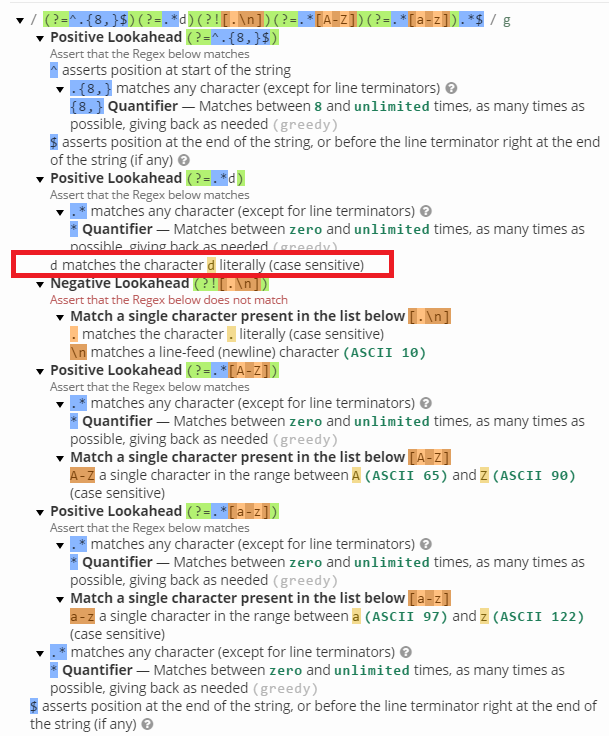
"(?=^.{8,}$)(?=.*\d)(?![.\n])(?=.*[A-Z])(?=.*[a-z]).*$"

This is the actual regular expression that the browser was seeing after transpiling:

"(?=^.{8,}$)(?=.*d)(?![.\n])(?=.*[A-Z])(?=.*[a-z]).*$"

There are no typos, the second group is missing the backward slash before the d,  while the third group has kept the backslash before the n, I don't understand why this is, but we can ignore this for the purposes of this little tale.

In any case, the intention was this:


The actual expression was this:


This would not have been an issue had it been tested properly or had our convention for development passwords deviated from variations on leet speak versions of the word password, which contained the required d.

D'OH

So the new guy joins us and he has this issue assigned to him. He clearly struggles to understand the issue, although I make it clear to him that if he gets stuck he should not hesitate to talk to me, but he doesn't. In fact, in the first two days he only asks me about a single issue, which turns out to be a node issue and was actually preventing him from getting started.

In any case, at the end of his second day of work, he submits a pull request and goes offline. I look at the pull request and this is what he came up with:

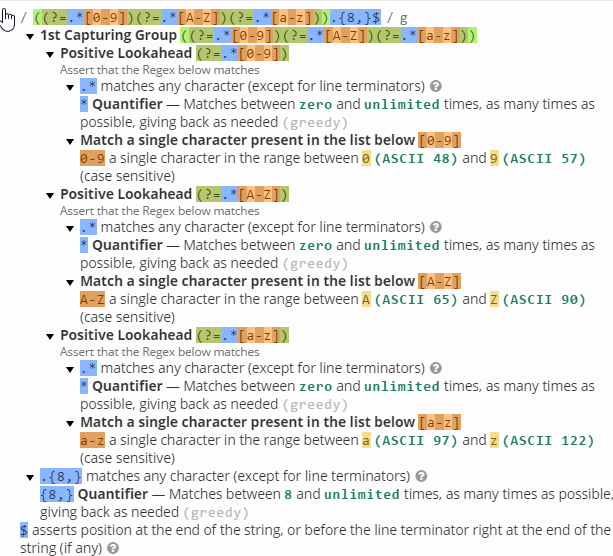
"((?=.*[0-9])(?=.*[A-Z])(?=.*[a-z])).{8,}$"


This is exactly what is required and is far simpler than the original regular expression, while at the same time bypassing any potential escaping issues.

I'll state the obvious, which is:
Sometimes a head on approach is less likely to solve an issue than a side ways approach

If you know why the escaping issue (We're using Aurelia) leave a comment.

Saturday, 27 August 2016

Have I broken LinkedIn's Job Recommendation Engine?

I obviously haven't broken the engine, sorry about the click bait title but I have found that the job recommendation engine is actually pretty rubbish, it's only taken me around four years to find out.

Back in 2012 or thereabouts, I was working as a Dynamics CRM developer when I started using LinkedIn. LinkedIn has this feature, where emails containing job ads that match one's preferences are sent out, even if one hasn't set said preferences. By and large these jobs where relevant, sure, they would contain the odd random job, which as far as I could work out was only relevant geographically, i.e. they were in the city I live in or the odd job that related to actual Customer Relationship Management, but in general the emails contained relevant job ads.

This situation continued more or less unchanged for the next 3 years while I continued working as a Senior/Lead Dynamics CRM developer and then it wasn't much changed when I became a Solutions Architect, apart from the frequency of the emails, which markedly increased.

Sure, the emails did contain the odd job ad for old fashioned architects, you know the ones that design buildings and they would also contain job ads for other IT architects (Infrastructure, Networking, Cloud Technologies (AWS/Azure mostly)) and even for developer roles but they were mostly relevant.

About a year ago, I became the Head of IT of a small company and that's when LinkedIn's Job Recommendation Engine started going pear shaped.

It turns out that Heat of IT seems to be too vague a title for the engine to deal with so the emails just contain jobs that revert back to mostly geographical significance and I say mostly because  the emails now contain  job ads that are completely irrelevant, e.g. secretary 100 miles from home, see a list of f jobs contained in the last email:

Finance Analyst - Home town
Network Engineer - Home town
Planning Manager - Home town
Ruby Web Developer - 50 miles from home.
PHP Developer - Home town

I did get a few emails a couple of month back that contained a job listing for a Head of IT and another for a Head of Technology, but given that these emails seem to be coming weekly or more often, this is very poor.

What is strange is that when I first joined this company I used to get emails containing jobs for Head of just about everything but IT, I'm probably exaggerating a little bit here as this is all from memory until I started to twig that something had gone wrong with the emails.

Maybe, LinkedIn is trying to tell me something about my choice of career.

Thursday, 31 March 2016

The Pluralsight Mobile App Sucks

There is a request to allow offline storage of courses on the SD card but it's been active for over two years now.

This can't be an insurmountable problem as quite a few apps quite happily allow this:


In any case, yesterday after I could not update several apps for lack of space for about the umpteenth time, I thought, enough is enough and I endeavored to find a solution.

I first wrote a small script in PowerShell that called Handle.exe on a loop, to get the list of files being opened by the pluralsight desktop app and wrote that list of files to a file:

if (-not (test-path 'handle.exe'))
{
 write-host "Can't find handle.exe"
 break;
}

$files= @()

while($true) 
{
 $video =.\Handle.exe -p pluralsight | Select-String mp4
 
 if ($video)
 {
  $path = $video.Line.Split(')')[1] 

  if (-not($files.Contains($path)))
  {
   Write-Host $path
   Write-Host "Files Added So far: " + $($files.Count)
   $files+=$path
   $files > file.txt
  }
 }
}

This required me to click on each chapter (video) of the course to get it to be logged by handle, which while a little bit annoying I thought could be automated somehow with CodedUI or AutoHotKey but the former was not very reliable and I didn't have the patience for the latter.

The above script worked on the first course I tried but it was a bit hit and miss on the second and after a lot of playing about I realized that for small videos it would simply not work, not sure why that is, is it reading the file quicker than the loop loops?  I've not stopped to do the maths but it seems odd in any case.

The second part of the process was the script below, which moves the files to a new folder so that they can be copied safely across to the phone/tablet:

param ( [Parameter(Mandatory)] [ValidateScript({Test-Path $_})][string]$sourceFile, [Parameter(Mandatory)][ValidateScript({Test-Path $_})][string]$destination)

$files = Get-Content $sourceFile
$counter = 0 

foreach($file in $files)
{ 
 $dest = $(join-path $destination $counter) + ".mp4"
 Copy-Item $file.Trim() $dest
 $counter++
}

If the first script grabbed all files, then this script worked fine, but like I said, it didn't always do it, it seemed not to work for small files.

So, I did a bit more googleing, alas, it seems that there is no strace equivalent in Windows and then when I was about to give up*, I hit upon Process Monitor, which does exactly what I needed, in other words, and among other things, it can list the files that an application opens. In order to do this, all that is needed is the correct filter and a little bit more of PowerShell scripting.

Open Process Monitor -> Filter and set the following filters (in green):


In reality, it's probably enough to do the path ends with mp4 filter as no operation seems to generate a single entry for a file read, which means that some processing will be needed, but the QueryNetworkOpenInformationFile Operation seems to generate the fewer hits so I stuck with that.

Note, sometimes it simply doesn't register anything, in which case, just restart Process Monitor.

With this running, I can now go through all the chapters of the course that I want to watch on my mobile and I get something like this:

Now it's time to export the results to a CSV file, which you can do by simply pressing CTRL + S

Finally, it's time to process the file that I've just saved, for which I slightly modified the second PowerShell script:

param ( [Parameter(Mandatory)] [ValidateScript({Test-Path $_})][string]$sourceFile, [Parameter(Mandatory)][ValidateScript({Test-Path $_})][string]$destination)

$source = Import-CSV $sourceFile
$files=@()
$source.Path | % { if (!$files.Contains($_)){$files+=$_}}

$counter = 0 

foreach($file in $files)
{
 if ($counter -lt 10) { $prefix= "0" + $counter} else {$prefix=$counter}
 $dest = $(join-path $destination $prefix) + ".mp4"
 Copy-Item $file.Trim() $dest
 $counter++
}

The above script is fine, but I'd rather have a single file than loads of files, so I use ffmpeg to concatenate the clips:
param ( [Parameter(Mandatory)] [ValidateScript({Test-Path $_})][string]$sourceFile, [Parameter(Mandatory)][string]$destFile, [Parameter(Mandatory)] [ValidateScript({Test-Path $_})][string]$ffmpeg)

$source = Import-CSV $sourceFile
$files=@()
$source.Path | % { if (!$files.Contains("file '" + $_.Replace('\','\\') + "'")){$files+="file '" + $_.Replace('\','\\') + "'"}}

$fileList = (Get-Date).Ticks

Set-Content -Path $fileList -Value $files

$x= $ffmpeg + " -f concat -i $filelist -codec copy $destFile"

Invoke-Expression $x

Remove-Item $fileList
Remove-Item $sourceFile -Confirm
Using this technique is actually quite flexible I can create individual videos for each module if a single video for the whole course is too unwieldy.

Unfortunately, this last step doesn't appear to work too well on new pluralsight videos, which is annoying as there doesn't appear to be a free Video Player for Android that does all of these:
  • Play all files from a directory.
  • Play at up 1.5x speed.
  • Allow the video to fill the screen.
So I say that there is no free video player that does this at the moment for Android.